
Chevrolet Cruze Owners Manual: Antilock Brake System (ABS) Warning Light
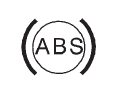
The Antilock Brake System (ABS) light comes on briefly when the engine is started.
If the light does not come on, have it fixed so it will be ready to warn if there is a problem.
If the ABS light comes on and stays on while driving, stop as soon as possible and turn the ignition off.
Start the engine again to reset the system. If the light stays on after driving at a speed above 20 km/h (13 mph), see your dealer for service. A chime may also sound when the light comes on steady.
If the regular brake system warning light is not on, the vehicle still has brakes, but not antilock brakes.
If the regular brake system warning light is also on, the vehicle does not have antilock brakes and there is a problem with the regular brakes.
 Brake System Warning Light
The vehicle brake system consists of two hydraulic circuits. If one circuit is
not working, the remaining circuit can still work to stop the vehicle. For normal
braking performance, both circuits ...
 Up-Shift Light
For manual transmission vehicles, there is an up-shift light that comes on in
the lower DIC area. It shows when to shift to the next higher gear for best fuel
economy. ...
Other materials:
Dual Phase Steel
This information provides repair recommendations and general guidelines for
steel classified as Dual Phase Steel (Dual Phase Steel with a
tensile strength up to and including 800 MPa), also known as DP.
General Motors recommends the following when repairing or replacing this type of
steel du ...
Removal Procedure
Warning: Refer to Approved Equipment for Collision Repair Warning in the
Preface section.
Warning: Refer to Glass and Sheet Metal Handling Warning in the Preface section.
Disable the SIR System. Refer to SIR Disabling
and Enabling.
Disconnect the negative battery cable. Refer to Batter ...
Navigation Symbols
Following are the most common symbols that appear on a map screen.
The vehicle symbol indicates the current position and heading direction of the
vehicle on the map.
The destination symbol marks the final destination after a route has been planned.
The waypoint symbol marks one or more se ...
