
Chevrolet Cruze Owners Manual: Cruise Control
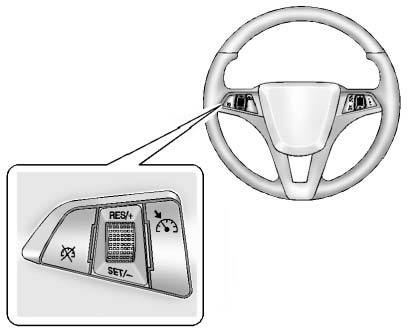
For vehicles with cruise control:  : Press to turn the cruise control system on and off.
RES/+: Move the thumbwheel up to resume a previously set speed or to accelerate.
SET/−: Move the thumbwheel down to set a speed or to make the vehicle decelerate.
 : Press to disengage cruise control
without erasing the set speed from memory.
: Press to disengage cruise control
without erasing the set speed from memory.
 Steering Wheel Controls
For vehicles with audio steering wheel controls, some audio controls can be adjusted
at the steering wheel.
: For vehicles with a Bluetooth,
OnStar, or navigation system, press to interact wit ...
 Navigation System
If the vehicle has a navigation system, there is a separate navigation manual
that includes information on the radio, audio players, and navigation system.
The navigation system provides detailed m ...
Other materials:
California Fuel Requirements
If the vehicle is certified to meet California Emissions Standards, it is designed
to operate on fuels that meet California specifications. See the underhood emission
control label. If this fuel is not available in states adopting California Emissions
Standards, the vehicle will operate satisf ...
Rear Suspension
Specifications
Rear Suspension Components
Rear Shock Absorber Upper Mount
Rear Shock Absorber Upper Mount
Rear Shock Absorber Upper Mount
Rear Shock Absorber Upper Mount
Shock Absorber Assembly
Upper Dumping Ring
Rear Spring
Lower Dumping Ring
Rear Axle Bushing
Rear Ax ...
Starting the Engine
Place the transmission in the proper gear.
Notice: If you add electrical parts or accessories, you could change
the way the engine operates. Any resulting damage would not be covered by the vehicle
warranty.
Automatic Transmission
Move the shift lever to P (Park) or N (Neutral). The engine wi ...
