
Chevrolet Cruze Repair Manual: Installation Procedure
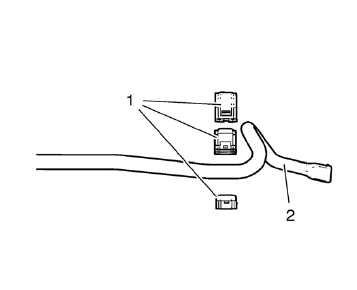
- Install NEW stabilizer shaft insulators (1) to stabilizer shaft (2) so that the slit in the insulator is facing the rear of the vehicle.
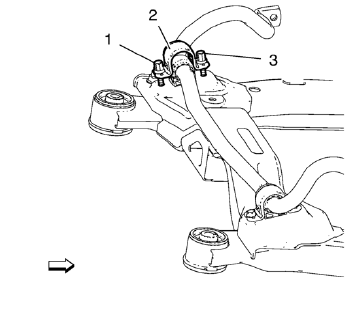
- Install the insulator c 2. lamp to the insulator:
2.1. Position the clamp (2) over on the insulator.
2.2. Use two M8 bolts (1, 3) with 40 mm (1.57 in) length.
2.3. Tighten bolts (1, 3) by turns until clamp (2) slips over insulator.
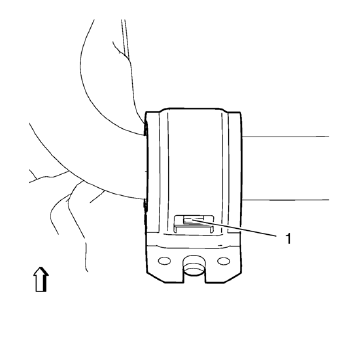
- Check proper fitting of clamp and insulator.
Retainer (1) MUST seat centrically in the hole of the clamp.
Caution: Refer to Fastener Caution in the Preface section.
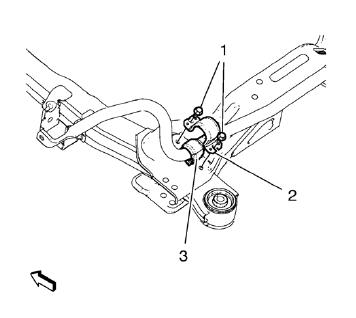
- Install the NEW stabilizer shaft bolts (1) and tighten the NEW stabilizer shaft bolts to 22 N·m (17 lb ft) + 40° using the EN 45059 kit .
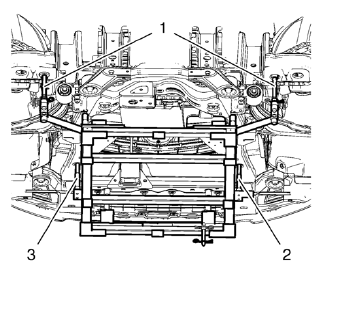
- Move out positioning pins (1) of CH 49289 adapter .
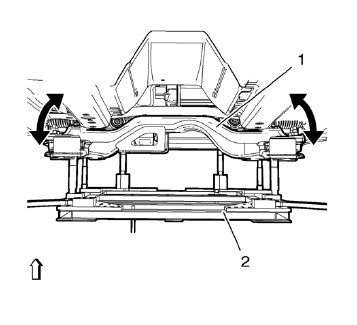
- Carefully, raise the frame (1) using CH 49289 adapter (2).
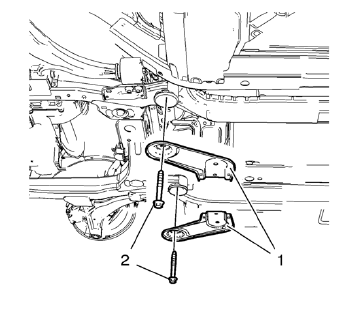
Note: Do NOT reuse old bolts.
- Install the 2 frame reinforcements (1).
- Install the 2 NEW frame rear bolts (2) and tighten to 160 N·m (118 lb ft).
- Install the front transmission mount bolt (1) and tighten to 58 N·m (43 lb ft).
- Install the rear transmission mount bracket bolt (2) and tighten to 100 N·m (74 lb ft).
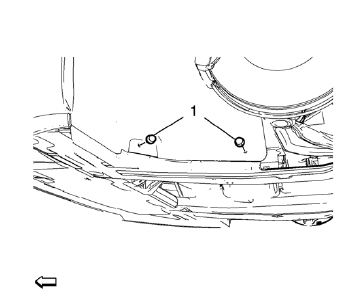
- Install and tighten 4 fasteners (1) to the engine side cover on both sides.
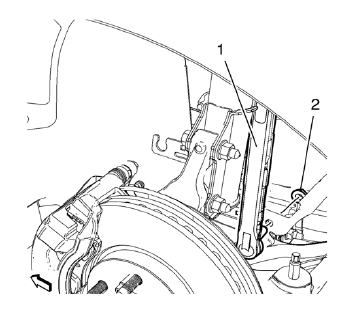
- Install and tighten lower stabilizer link shaft nut (2) on both sides to 35 N·m (26 lb ft)
- Lower the vehicle.
- Install the front tire and wheel assemblies. Refer to Tire and Wheel Removal and Installation
 Removal Procedure
Turn the front wheels to the straight forward position and secure the
steering wheel from moving.
Remove the 2 lower steering intermediate shaft bolts (1).
Remove the steering ...
 Front Wheel Bearing and Hub Replacement
Special Tools
EN-45059 Torque Angle Sensor Kit
For equivalent regional tools, refer to Special Tools. ...
Other materials:
Moveable Window Schematics
Defogger Schematics
Window System Component Views
Window Systems Component Views
...
Information Displays
Driver Information Center (DIC)
The DIC displays information about your vehicle. It also displays warning messages
if a system problem is detected.
DIC Operation and Displays
The DIC has different displays which can be accessed by using the DIC buttons
on the turn signal lever.
The DIC displ ...
Recommended Fuel
Use regular unleaded gasoline with a posted octane rating of 87 or higher. If
the octane rating is less than 87, an audible knocking noise, commonly referred
to as spark knock, might be heard when driving.
If this occurs, use a gasoline rated at 87 octane or higher as soon as possible.
If hea ...
