
Chevrolet Cruze Repair Manual: Driver or Passenger Seat Back Cushion Cover and Pad Replacement
Removal Procedure
Warning: Refer to SIR Warning in the Preface section.
Warning: Replace the passenger presence system as a complete assembly to prevent possible injury to the occupant. The bladder, the pressure sensor, the seat cushion, and the control module are assembled and calibrated as a unit. Using only some of the components in the service kit will cause the passenger presence system to operate improperly.
- Remove driver or passenger seat. Refer to Driver or Passenger Seat Replacement.
- Remove front seat adjuster handle, if equipped.
- Remove front seat recliner handle. Refer to Driver or Passenger Seat Recliner Handle Replacement.
- Remove seat cushion inner trim panel. Refer to Front Seat Cushion Inner Trim Panel Replacement
- Remove seat cushion outer trim panel. Refer to Front Seat Cushion Outer Trim Panel Replacement.
- Remove front seat head restraint guide. Refer to Front Seat Head Restraint Guide Replacement.
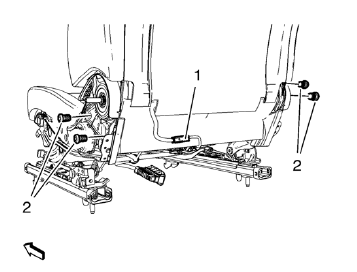
- Detach cushion cover from backrest below.
- Release and disconnect wiring harness plug (1), if equipped.
- Remove 4 front seat backrest screw (2).
- Remove backrest.
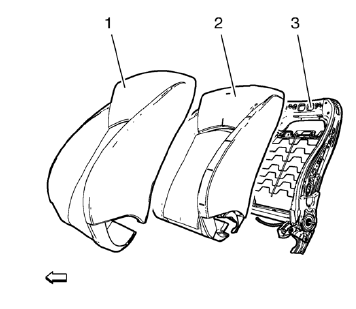
- Remove cushion cover (1) on backside.
- Open 2 zippers on backside.
- Loosen cushion covering all the way around.
- Remove front seat back cushion cover (1).
- Detach cushion cover from frame (3).
- Remove cushion cover (1) from Velcro.
- Remove front seat back cushion pad (2).
Installation Procedure
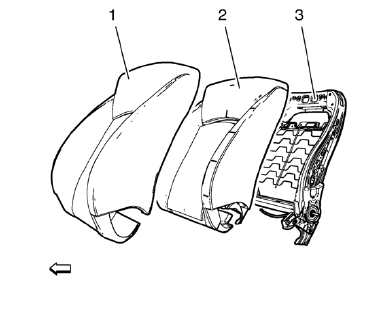
- Install front seat back cushion pad (2).
- Install front seat back cushion cover (1).
- Install cushion cover (1) to Velcro.
- Attach cushion cover to frame (3).
- Install cushion cover (1) to backside.
- Install cushion covering all the way around.
- Close 2 zippers on backside.
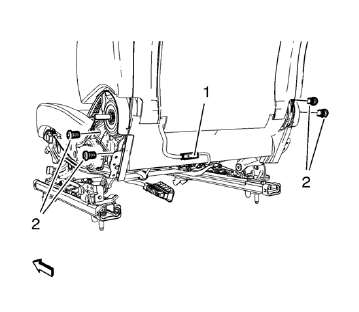
- Install backrest.
Caution: Refer to Fastener Caution in the Preface section.
- Install the front seat backrest bolts (2) and tighten to 35 N·m (26 lb ft).
- Connect and latch wiring harness plug (1), if equipped.
- Attach cushion cover to backrest below.
- Install front seat head restraint guide. Refer to Front Seat Head Restraint Guide Replacement.
- Install seat cushion outer trim panel. Refer to Front Seat Cushion Outer Trim Panel Replacement.
- Install seat cushion inner trim panel. Refer to Front Seat Cushion Inner Trim Panel Replacement.
- Install front seat recliner handle. Refer to Driver or Passenger Seat Recliner Handle Replacement.
- Install front seat adjuster handle, if equipped.
- Install driver or passenger seat. Refer to Driver or Passenger Seat Replacement.
 Front Seat Cushion Cover and Pad Replacement
Removal Procedure
Warning: Refer to SIR Warning in the Preface section.
Warning: Replace the passenger presence system as a complete assembly to prevent
possible injury to the occupant. The blad ...
 Driver or Passenger Seat Recliner Handle Replacement
Recliner Handle Panel Seat Backrest
Procedure
Use flat blade to removel panel.
Recliner Handle Seat Backrest
Procedure
Use flat blade to remove handle. ...
Other materials:
Windshield Washer Nozzle Hose Replacement
Preliminary Procedure
Remove the hood insulator. Refer to
Hood Insulator Replacement.
Place a clean container under the front driver side near where the
windshield washer nozzle and windshield washer pump
hose will be disconnected.
Recover all lost windshield washer solven ...
Power Windows Description and Operation
Power Windows System Components
The power window system consists of the following components:
Driver window switch
Passenger window switch
Left rear window switch
Right rear window switch
Window motors in each of the doors
F24UA 30A Fuse
F55UA 7.5A Fuse
F21UA 7.5A Fuse
Body cont ...
Voice Recognition
Voice recognition allows for hands-free operation of the infotainment system
features.
Voice recognition can be used when the radio is on or when Retained Accessory
Power (RAP) is active.
See “Retained Accessory Power (RAP)” in the owner manual. The system maintains
a minimum volume level.
...
