
Chevrolet Cruze Owners Manual: Hazard Warning Flashers
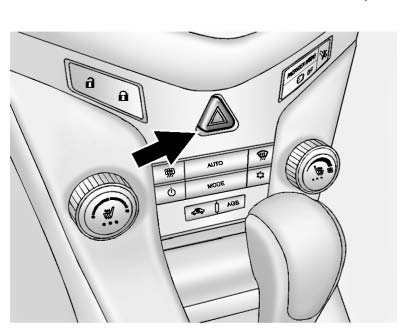
 (Hazard Warning Flasher):
Press and momentarily hold this button on the instrument panel above the climate control system, to make the front and rear turn signal lamps flash on and off. This warns others that you are having trouble.
Press and momentarily hold again to turn the flashers off.
 Automatic Headlamp System
When it is dark enough outside and the exterior lamp control is in the automatic
position, the headlamps come on automatically.
The vehicle has a light sensor on top of the instrument panel. Make ...
 Turn and Lane-Change Signals
Move the lever all the way up or down to signal a turn.
An arrow on the instrument cluster will flash in the direction of the turn or
lane change.
Raise or lower the lever until the arrow starts ...
Other materials:
Engine Oil Life System
When to Change Engine Oil
This vehicle has a computer system that indicates when to change the engine oil and filter. This is based on a combination of factors which include engine revolutions, engine temperature, and miles driven.
Based on driving conditions, the mileage at which an oil ...
Removal Procedure
Warning: Refer to Approved Equipment for Collision Repair Warning in the
Preface section.
Warning: Refer to Glass and Sheet Metal Handling Warning in the Preface section.
Disable the SIR System. Refer to SIR Disabling and Enabling.
Disconnect the negative battery cable. Refer ...
Clock
The infotainment system controls are used to access the time and date settings
through the menu system. For vehicles with a connective radio or navigation system,
see the infotainment manual.
Setting the Time and Date
To set the time and date for the radio with CD:
1. Press CLOCK.
2. Select ...
