
Chevrolet Cruze Repair Manual: Hood Primary and Secondary Latch Replacement
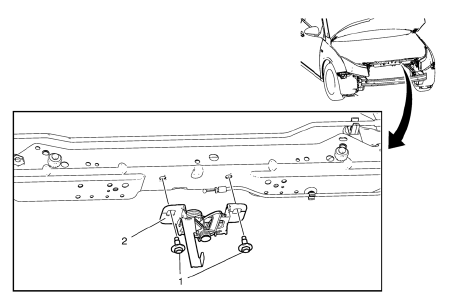
Preliminary Procedure
- Remove the front bumper fascia. Refer to Front Bumper Fascia Replacement.
- Remove the radiator grille support reinforcement. Refer to Radiator Grille Reinforcement Support Replacement.
- Hood Primary and Secondary Latch Retainer Bolt (Qty: 2)
Caution: Refer to Fastener Caution in the Preface section.
Tighten 20 N·m (15 lb ft).
- Hood Primary and Secondary Latch
Procedure
- To release the hood primary and secondary latch unhook the hood primary latch release cable.
- Disconnect electrical connectors as needed.
 Hood Replacement
Warning: When a hood hold open device is being removed or installed,
provide alternate support to avoid the possibility of
damage to the vehicle or personal injury.
Preliminary Procedure
Remo ...
 Rear Compartment Lid Adjustment
Rear Compartment Lid
Caution: Refer to Fastener Caution in the Preface section.
Procedure
Loosen the rear compartment lid hinge bolt (Qty: 4) to
adjust the rear compartment li ...
Other materials:
Removal Procedure
Warning: Refer to Glass and Sheet Metal Handling Warning in the
Preface section.
Disable the SIR System. Refer to SIR Disabling
and Enabling.
Disconnect the negative battery cable. Refer to Battery Negative Cable
Disconnection and Connection.
Remove the rear side door. Refer to ...
Power Steering Pump Belt Replacement
Special Tools
CH 49800 Installer Power Steering Pump Belt
For equivalent regional tools, refer to Special Tools.
Removal Procedure
Caution: Do not use belt dressing on the drive belt. Belt dressing
causes the breakdown of the composition of the drive belt. Failure
to follow this recommendatio ...
Removal Procedure
Warning: Refer to Approved Equipment for Collision Repair Warning in the
Preface section.
Warning: Refer to Glass and Sheet Metal Handling Warning in the Preface section.
Disable the SIR System. Refer to SIR
Disabling and Enabling.
Disconnect the negative battery cable. Refer to ...
