
Chevrolet Cruze Repair Manual: Installation Procedure
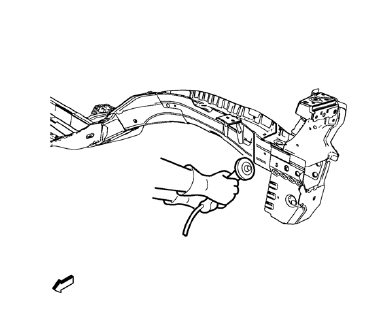
- Cut the front compartment front rail in corresponding locations to fit the remaining original panel. The sectioning joint should be trimmed to allow a gap of one-and-one-half-times the metal thickness at the sectioning joint.
- Create a 50 mm (2 in) backing plate from the unused portion of the service part.
Note: Place backing plate only in areas where adequate space is available.
- Drill 8 mm (5/16 in) along the sectioning cut on the remaining original part. Locate these holes 13 mm (1/2 in) from the edge of part and spaced 40 mm (1 1/2 in) apart.
- Prepare all mating surfaces as necessary.
- Fit the backing plates halfway into the sectioning joints, clamp in place and plug weld to the vehicle.
- Align the front compartment front rail.
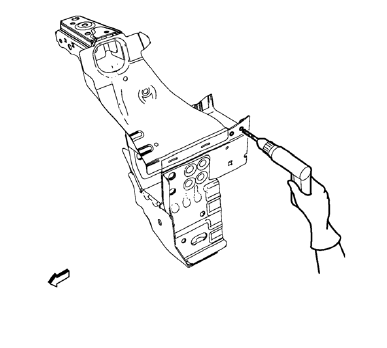
Note: Left side only.
- Drill 8 mm (5/1 in) for plug welding along the edges of the front compartment front rail as noted from the original panel.
- Clean and prepare the attaching surfaces for welding.
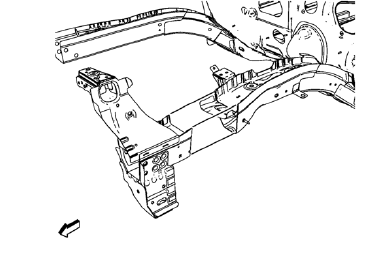
- Position the front compartment front rail on the vehicle.
- Verify the fit of the front compartment front rail.
- Clamp the front compartment front rail into position.
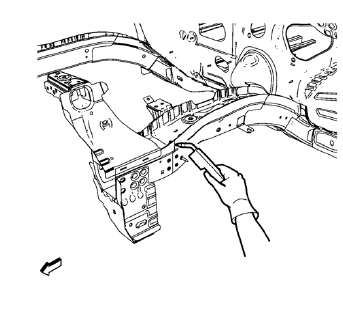
- Plug weld accordingly.
- To create a solid weld with minimum heat distortion, make 25 mm (1 in) stitch welds along the seam with 25 mm (1 in) gaps between them. Then go back and complete the stitch weld.
- Apply the sealers and anti-corrosion materials to the repair area, as necessary. Refer to Anti-Corrosion Treatment and Repair.
- Paint the repaired area. Refer to Basecoat/Clearcoat Paint Systems.
- Install all related panels and components.
- Connect the negative battery cable. Refer to Battery Negative Cable Disconnection and Connection
- Enable the SIR system. Refer to SIR Disabling and Enabling.
 Removal Procedure
Warning: Refer to Approved Equipment for Collision Repair Warning in the
Preface section.
Warning: Refer to Collision Sectioning Warning in the Preface section.
Warning: Refer to Glass and She ...
 Front Compartment Side Rail Sectioning (Short, MIG-Brazing)
Note: According to different corrosion warranties, only the
regional mandatory joining methods are allowed. ...
Other materials:
Filling the Tank
WARNING
Fuel vapors and fuel fires burn violently and can cause injury or death.
• To help avoid injuries to you and others, read and follow all the instructions
on the fuel pump island.
• Turn off the engine when refueling.
• Keep sparks, flames, and smoking materials away from fuel.
• Do no ...
Reclining Seatbacks
WARNING
If either seatback is not locked, it could move forward in a sudden stop or
crash. That could cause injury to the person sitting there.
Always push and pull on the seatbacks to be sure they are locked.
To recline the seatback:
1. Lift the lever.
If necessary, move the safety belt ou ...
Generator Air Conditioning Compressor,Power Steering Pump Belt Replacement
Removal Procedure
Raise the vehicle full height. Refer to Lifting and Jacking the Vehicle.
Remove the front compartment splash shield. Refer to Front Compartment
Splash Shield Replacement.
Rotate the drive belt tensioner bolt (2) clockwise.
Remove the drive belt (1) while pullin ...
