
Chevrolet Cruze Repair Manual: Installation Procedure
- Apply structural adhesive on the flanges of the rear side door inner panel where the rear side door outer panel bears on.
- Align the rear side door outer panel.
- Verify the fit of the rear side door outer panel.
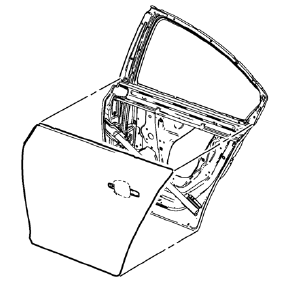
- Clamp the rear side door outer panel into position.
- Pre-flanging the flange with BO-6396 pliers and BO-6392 tool kit .
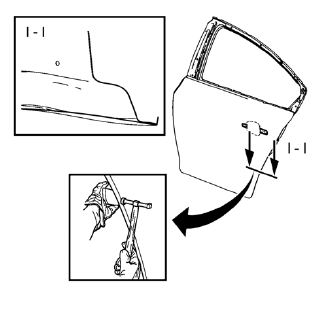
- Continue to hammer in stages along the hem flanges.
- Apply the sealers and anti-corrosion materials to the repair area, as necessary. Refer to Anti-Corrosion Treatment and Repair.
- Install the rear side door outside handle. Refer to Rear Side Door Outside Handle Replacement.
- Install the rear side door. Refer to Rear Side Door Replacement.
- Paint the repaired area. Refer to Basecoat/Clearcoat Paint Systems.
- Connect the negative battery cable. Refer to Battery Negative Cable Disconnection and Connection
- Enable the SIR system. Refer to SIR Disabling and Enabling.
 Removal Procedure
Warning: Refer to Glass and Sheet Metal Handling Warning in the
Preface section.
Disable the SIR System. Refer to SIR
Disabling and Enabling.
Disconnect the negative battery cable. R ...
 Rear Rail Sectioning (MAG-Welding)
Note: According to different corrosion warranties, only the
regional mandatory joining methods are allowed. ...
Other materials:
Child Seat Restraint System
Warning: A child in a rear-facing child restraint can be seriously
injured if the right-front passengers air bag inflates. This is because the
back of a rear-facing child restraint would be very close to the inflating air
bag. NEVER use a rear-facing child restraint in this vehicle. If a
forwa ...
Rear Compartment Lid Emblem/Nameplate Replacement (VCDi AT)
Rear Compartment Lid Emblem Assembly
Caution: Refer to Exterior Trim Emblem Removal Caution in the
Preface section.
Procedure
The part and surface should be 21°C (70°F) prior to installation. The
vehicle should remain 21°C (70°F) for
one hour after assembly to allow adhesive to deve ...
Rear Axle Bushing Replacement
Special Tools
CH 6616 Hydraulic Hand Pump
CH 6615-10 Hydraulic Cylinder
CH-48377-1 Chisel
CH-49233 Adapter
CH 906-42 Adapter
For equivalent regional tools. Refer to Special Tools
Removal Procedure
Warning: Use of eye goggles is necessary to prevent personal injury.
Remove the re ...
