
Chevrolet Cruze Repair Manual: Removal Procedure
Warning: Refer to Glass and Sheet Metal Handling Warning in the Preface section.
- Disable the SIR System. Refer to SIR Disabling and Enabling.
- Disconnect the negative battery cable. Refer to Battery Negative Cable Disconnection and Connection.
- Remove the rear side door. Refer to Rear Side Door Replacement.
- Remove the rear side door outside handle. Refer to Rear Side Door Outside Handle Replacement.
- Remove the sealers and anti-corrosion materials from the repair area, as necessary. Refer to Anti-Corrosion Treatment and Repair.
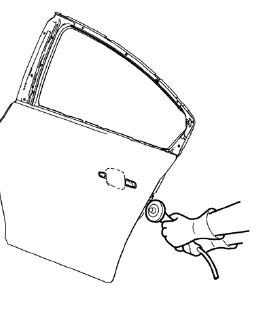
- Grind the edges of the rear side door outer panel to separate the outer door panel from the door shell.
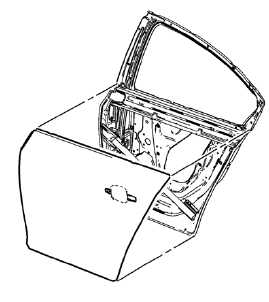
- Remove the rear side door outer door panel.
- Remove the sealers and anti-corrosion materials from the repair area, as necessary. Refer to Anti-Corrosion Treatment and Repair.
- Straighten the edges of the door shell.
 Rear Side Door Outer Panel Replacement (MIG-Brazing)
Special Tools
BO-6396 Bonding Pliers
BO-6392 Flanging Tool Kit
For equivalent regional tools, refer to Special Tools.
Note: According to different corrosion warranties, only the
regional m ...
 Installation Procedure
Apply structural adhesive on the flanges of the rear side door inner
panel where the rear side door outer panel bears on.
Align the rear side door outer panel.
Verify the fit of the rear sid ...
Other materials:
Reduced Engine Power Light
The reduced engine power light should come on briefly as the engine is started.
If it does not come on, have the vehicle serviced by your dealer.
This light, along with the malfunction indicator lamp, displays when a noticeable
reduction in the vehicle's performance occurs. Stop the vehic ...
Installation Procedure
Drill 8 mm (5/16 in) for plug welding along the edges of the front
wheelhouse panel rear reinforcement as noted from the original
panel.
Drill 8 mm (5/16 in) for plug welding where front wheelhouse front panel
and front wheelhouse panel rear reinforcement overlap ...
Battery Negative Cable Disconnection and Reconnection
Removal Procedure
Turn on the radio and record all of the customer radio station presets.
Ensure that all lamps and accessories are turned off.
Turn the ignition OFF and remove the ignition key.
Warning: Refer to Battery Disconnect Warning in the Preface section.
Loosen the negati ...
