
Chevrolet Cruze Repair Manual: Installation Procedure
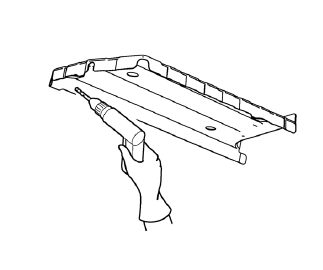
Note: If the location of the original plug weld holes can not be determined, space the braze holes every 40 mm (1½ in).
- Create 5 x 18 mm (4/16 x 11/16 in) slots for MIG-brazing along the edges of the rear floor panel filler as noted from the original panel.
- Clean and prepare the attaching surfaces for welding.
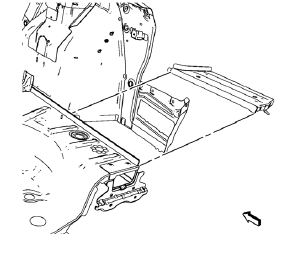
- Position the rear floor panel filler on the vehicle.
- Verify the fit of the rear floor panel filler.
- Clamp the rear floor panel filler into position.
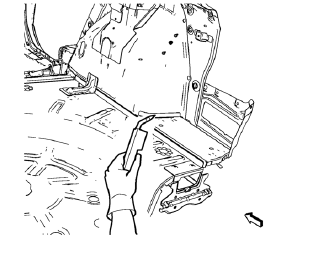
- Braze accordingly.
- Apply the sealers and anti-corrosion materials to the repair area, as necessary. Refer to Anti-Corrosion Treatment and Repair.
- Paint the repaired area. Refer to Basecoat/Clearcoat Paint Systems
- Install all related panels and components.
- Connect the negative battery cable. Refer to Battery Negative Cable Disconnection and Connection.
- Enable the SIR system. Refer to SIR Disabling and Enabling.
 Removal Procedure
Warning: Refer to Approved Equipment for Collision Repair Warning in the
Preface section.
Warning: Refer to Glass and Sheet Metal Handling Warning in the Preface section.
Disable the SIR Syst ...
 Tail Lamp Pocket Replacement (MAG-Welding)
Note: According to different corrosion warranties, only the
regional mandatory joining methods are allowed. ...
Other materials:
Maintenance Schedule
Owner Checks and Services
At Each Fuel Stop
• Check the engine oil level.
Once a Month
• Check the tire inflation pressures.
• Inspect the tires for wear.
• Check the windshield washer fluid level.
Engine Oil Change
When the CHANGE ENGINE OIL SOON DIC message or Code 82 DIC message dis ...
Mitsubishi Outlander Plug-In Hybrid Award in 2024
The Mitsubishi Outlander Plug-in Hybrid is a remarkable blend of clean electric motoring and the convenience of gasoline refueling. Designed as a seven-passenger SUV, it caters to drivers who want to embrace eco-friendly options without fully committing to all-electric vehicles. Mark Chaffin, ...
Passenger Airbag Status Indicator
The vehicle has a passenger sensing system.
The instrument panel has a passenger airbag status indicator.
United States
Canada
When the vehicle is started, the passenger airbag status indicator will light
ON and OFF, or the symbol for on and off, for several seconds as a system check.
If ...
