
Chevrolet Cruze Owners Manual: Power Door Locks
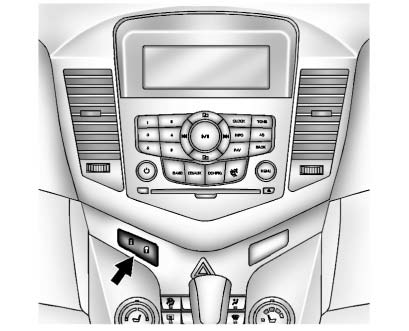
 (Lock)
: Press to lock the doors.
 (Unlock):
Press to unlock the doors.
 Door Locks
WARNING
Unlocked doors can be dangerous.
• Passengers, especially children, can easily open the doors and fall out of
a moving vehicle. The chance of being thrown out of the vehicle in a crash is ...
 Automatic Door Locks
Automatic Door Lock
The doors are programmed to automatically lock when the shift lever is moved
out of P (Park).
The automatic door lock feature cannot be disabled.
Automatic Door Unlock
The do ...
Other materials:
Removal Procedure
Warning: Refer to Approved Equipment for Collision Repair Warning in the
Preface section.
Warning: Refer to Glass and Sheet Metal Handling Warning in the Preface section.
Disable the SIR System. Refer to SIR
Disabling and Enabling.
Disconnect the negative battery cable. Refer to ...
Engine Compartment Fuse Block
To remove the fuse block cover, squeeze the clips and swing it up.
Notice: Spilling liquid on any electrical component on the vehicle
may damage it. Always keep the covers on any electrical component.
Engine Compartment Fuse Block
The vehicle may not be equipped with all of the fuses, relay ...
Auxiliary Devices
If equipped, the AUX inputs are in the center console and allows portable devices
to connect to the vehicle using the 3.5 mm(1/8 in) auxiliary jack or USB port.
3.5mm Jack
Connect a 3.5mm (1/8 in) cable to the auxiliary input jack to use a portable
audio player.
Playback of an audio device th ...
