
Chevrolet Cruze Owners Manual: Power Mirrors
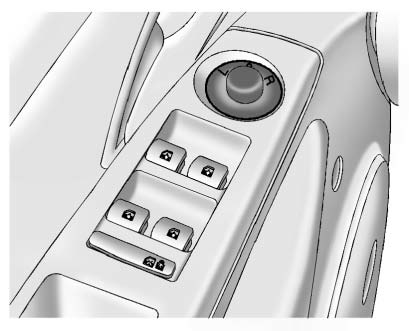
To adjust the mirror: 1. Turn the selector switch to L (Left) or R (Right) to choose the driver or passenger mirror.
2. Move the control to adjust the mirror.
3. Turn the selector switch to the O position to deselect the mirror.
 Manual Mirrors
Vehicles with a manual mirror adjustment have controls next to each mirror.
Adjust the inside rearview mirror by moving it up and down or side to side. Adjust
the mirror to avoid glare from the h ...
 Folding Mirrors
Manual Folding Mirrors
The vehicle has manual folding mirrors. These mirrors can be folded inward to
prevent damage when going through an automatic car wash. To fold, pull the mirror
toward the v ...
Other materials:
Braking
Braking action involves perception time and reaction time. Deciding to push the
brake pedal is perception time. Actually doing it is reaction time.
Average driver reaction time is about three-quarters of a second. In that time,
a vehicle moving at 100 km/h (60 mph) travels 20m (66 ft), which co ...
Interior Care
To prevent dirt particle abrasions, regularly clean the vehicle's interior.
Immediately remove any soils. Note that newspapers or dark garments that can
transfer color to home furnishings can also permanently transfer color to the vehicle's
interior.
Use a soft bristle brush to remove ...
Traction Control System (TCS)/StabiliTrak® Light
The StabiliTrak or Traction Control System (TCS) indicator/warning light comes
on briefly when the engine is started.
If the light does not come on, have the vehicle serviced by your dealer.
If the system is working normally, the indicator light turns off.
If the light is on and not flashing, ...
