
Chevrolet Cruze Repair Manual: Removal Procedure
Warning: Refer to Approved Equipment for Collision Repair Warning in the Preface section.
Warning: Refer to Glass and Sheet Metal Handling Warning in the Preface section.
- Disable the SIR System. Refer to SIR Disabling and Enabling.
- Disconnect the negative battery cable. Refer to Battery Negative Cable Disconnection and Connection.
- Remove all related panels and components.
- Visually inspect the damage. Repair as much of the damage as possible.
- Remove the sealers and anti-corrosion materials from the repair area, as necessary. Refer to Anti-Corrosion Treatment and Repair.
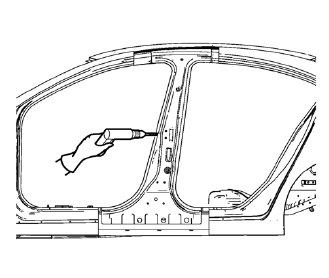
- Locate and mark all the necessary factory welds of the body lock pillar outer panel reinforcement.
- Drill all factory welds. Note the number and location of welds for installation of the service assembly.
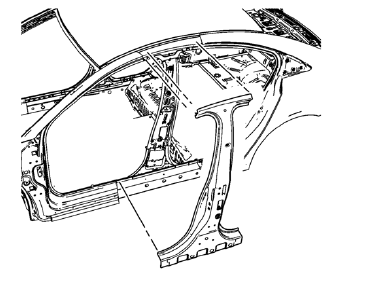
- Remove the damaged body lock pillar outer panel reinforcement.
 Body Lock Pillar Outer Panel Reinforcement Replacement (MAG-Welding)
Note: According to different corrosion warranties, only the
regional mandatory joining methods are allowed. ...
 Installation Procedure
Prepare all mating surfaces as necessary
Align the body lock pillar outer panel reinforcement.
Drill 8 mm (5/16 in) for plug welding along the edges of the body lock
pillar outer pan ...
Other materials:
Heated Front Seats
WARNING
If you cannot feel temperature change or pain to the skin, the seat heater
may cause burns. To reduce the risk of burns, people with such a condition should
use care when using the seat heater, especially for long periods of time. Do not
place anything on the seat that insulates again ...
Backup Lamp Replacement
Preliminary Procedures
Remove the rear compartment sill trim plate. Refer to Rear Compartment
Sill Trim Plate Replacement.
Disconnect the electrical harness connector from the backup lamp socket.
Back Up Lamp Nut (Qty: 4)
Caution: Refer to Fastener Caution in the Preface ...
Shifting Into Park
Use this procedure to shift into P (Park):
1. Hold the brake pedal down and set the parking brake.
2. Hold the button on the shift lever and push the lever toward the front of the
vehicle into P (Park).
3. Turn the ignition to LOCK/OFF.
Leaving the Vehicle with the Engine Running
WARNING
It ...
