
Chevrolet Cruze Repair Manual: Rear Side Door Weatherstrip Replacement - Door Side
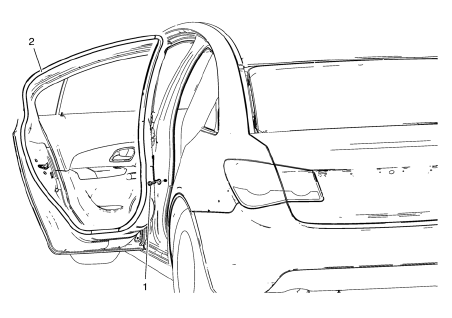
- Rear Side Door Check Bolt
Caution: Refer to Fastener Caution in the Preface section.
Tighten 25 N·m (19 lb ft)
- Rear Side Door Weatherstrip - Door Side
Procedure
- Unclip weatherstrip from rear side door.
- When removing protective liners from adhesive tape, be careful not to touch tape with hands and do not allow tape to come in contact with dirt or any foreign matter prior to adhesion.
 Rear Compartment Lid Weatherstrip Replacement
Rear Compartment Lid Weatherstrip
Procedure
Start at the upper corner of the rear compartment opening and pull the
weatherstrip away from the rear
compartment opening flange.
Position ...
 Rear Side Door Weatherstrip Replacement - Body Side
Rear Side Door Weatherstrip - Body Side
Procedure
Start at the front upper corner of the door opening and pull the
weatherstrip away from the door opening flange.
Position th ...
Other materials:
Removal Procedure
Warning: Refer to Approved Equipment for Collision Repair Warning in the
Preface section.
Warning: Refer to Collision Sectioning Warning in the Preface section.
Warning: Refer to Glass and Sheet Metal Handling Warning in the Preface section.
Disable the SIR System. Refer to SIR Dis ...
Removal Procedure
Warning: Refer to Approved Equipment for Collision Repair Warning in the
Preface section.
Warning: Refer to Collision Sectioning Warning in the Preface section.
Warning: Refer to Glass and Sheet Metal Handling Warning in the Preface section.
Disable the SIR System. Refer to SIR Dis ...
Installation Procedure
Cut the front hinge pillar body in corresponding locations to fit the
remaining original panel. The sectioning joint should be trimmed
to allow a gap of one-and-one-half-times the metal thickness at the
sectioning joint.
Create a 50 mm (2 in) backing plate from the unused portion of ...
