
Chevrolet Cruze Repair Manual: Installation Procedure
- Prepare all mating surfaces as necessary
- Align the body lock pillar outer panel reinforcement.
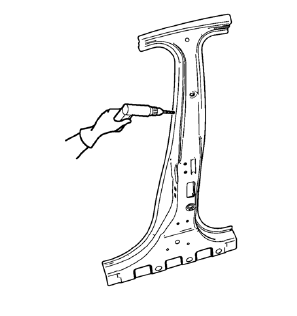
- Drill 8 mm (5/16 in) for plug welding along the edges of the body lock pillar outer panel reinforcement as noted from the original panel.
- Clean and prepare the attaching surfaces for welding.
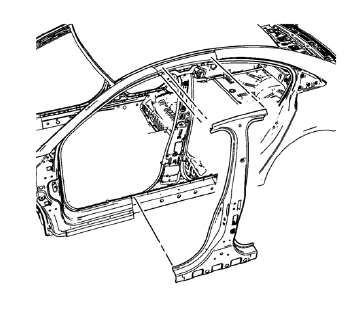
- Position the body lock pillar outer panel reinforcement on the vehicle.
- Verify the fit of the body lock pillar outer panel reinforcement
- Clamp the body lock pillar outer panel reinforcement into position.
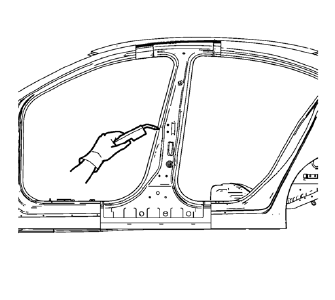
- Plug weld accordingly.
- To create a solid weld with minimum heat distortion, make 25 mm (1 in) stitch welds along the seam with 25 mm (1 in) gaps between them. Then go back and complete the stitch weld.
- Apply the sealers and anti-corrosion materials to the repair area, as necessary. Refer to Anti-Corrosion Treatment and Repair.
- Paint the repaired area. Refer to Basecoat/Clearcoat Paint Systems.
- Install all related panels and components.
- Connect the negative battery cable. Refer to Battery Negative Cable Disconnection and Connection.
- Enable the SIR system. Refer to SIR Disabling and Enabling.
 Removal Procedure
Warning: Refer to Approved Equipment for Collision Repair Warning in the
Preface section.
Warning: Refer to Glass and Sheet Metal Handling Warning in the Preface section.
Disable the SIR Syst ...
 Body Lock Pillar Outer Panel Reinforcement Replacement (MIG-Brazing)
Note: According to different corrosion warranties, only the
regional mandatory joining methods are allowed. ...
Other materials:
Removal Procedure
Warning: Refer to Approved Equipment for Collision Repair Warning in the
Preface section.
Warning: Refer to Collision Sectioning Warning in the Preface section.
Warning: Refer to Glass and Sheet Metal Handling Warning in the Preface section.
Disable the SIR System. Refer to SIR Dis ...
Shock Absorber Disposal
Warning: Gas charged shock absorbers contain high pressure gas. Do
not remove the snap ring from inside the top of the tube. If the snap
ring is removed, the contents of the shock absorber will come out with extreme
force which may result in personal injury.
Warning: To prevent personal inju ...
Front Side Door Window Weatherstrip Replacement
Preliminary Procedure
Remove the outside rearview mirror. Refer to Outside Rearview
Mirror Replacement.
Remove the front side door window frame rear cover. Refer to Front Side
Door Window Frame Rear Cover Replacement.
Front Side Door Window Weatherstrip
Procedure
Pull the ...
