
Chevrolet Cruze Repair Manual: Removal Procedure
Warning: Refer to Approved Equipment for Collision Repair Warning in the Preface section.
Warning: Refer to Collision Sectioning Warning in the Preface section.
Warning: Refer to Glass and Sheet Metal Handling Warning in the Preface section.
- Disable the SIR System. Refer to SIR Disabling and Enabling.
- Disconnect the negative battery cable. Refer to Battery Negative Cable Disconnection and Connection.
- Remove all related panels and components.
- Visually inspect the damage. Repair as much of the damage as possible.
- Remove the sealers and anti-corrosion materials from the repair area, as necessary. Refer to Anti-Corrosion Treatment and Repair.
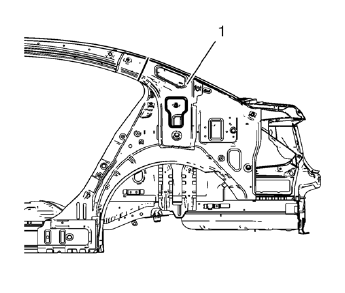
- Create cut lines on the body lock pillar upper reinforcement (1).
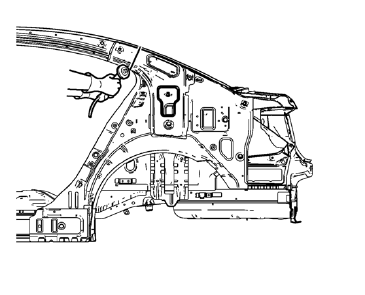
Note: Do not damage any other panels or reinforcements.
- Cut the panel where sectioning is to be performed.
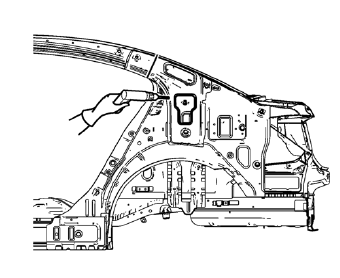
- Locate and mark all the necessary factory welds of the body lock pillar upper reinforcement.
- Drill all factory welds. Note the number and location of welds for installation of the service assembly.
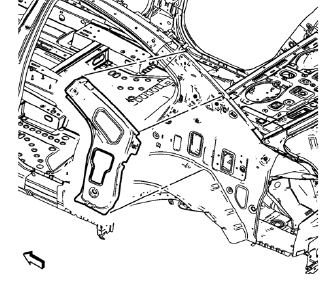
- Remove the damaged body lock pillar upper reinforcement.
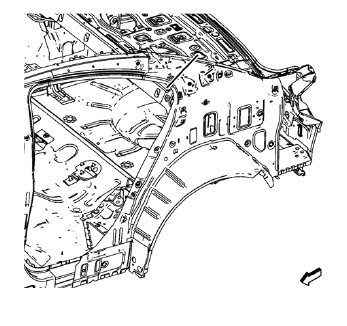
- Create cut lines on the body side inner panel.
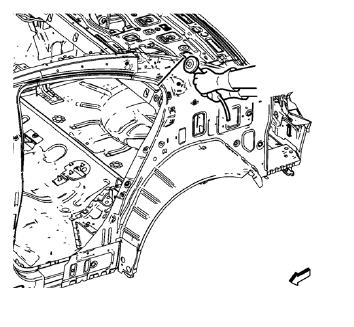
Note: Do not damage any other panels or reinforcements.
- Cut the panel where sectioning is to be performed.
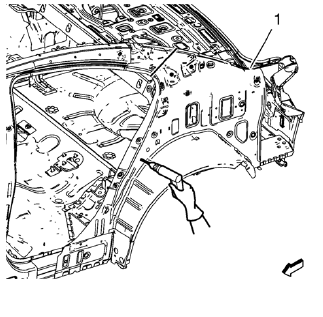
Note: Drill hidden factory welds where body side outer rear panel drain gutter (1) and body side inner panel overlap.
- Locate and mark all the necessary factory welds of the body side inner panel.
- Drill all factory welds. Note the number and location of welds for installation of the service assembly.
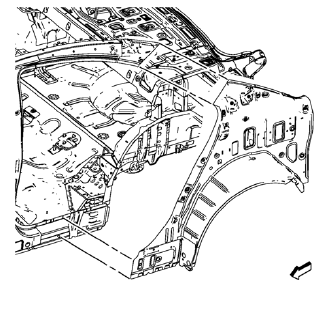
- Remove the damaged body side inner panel.
 Body Side Inner Panel Sectioning (MIG-Brazing)
Note: According to different corrosion warranties, only the
regional mandatory joining methods are allowed. ...
 Installation Procedure
Remove rear end upper panel extension (1) from service part.
Cut the body side inner panel in corresponding locations to fit the
remaining original panel. The sectioning joint shou ...
Other materials:
Automatic Headlamp System
When it is dark enough outside and the exterior lamp control is in the automatic
position, the headlamps come on automatically.
The vehicle has a light sensor on top of the instrument panel. Make sure it is
not covered, or the headlamps will be on when they are not needed.
The system may als ...
Quick Info
Quick Info gives access to quick information on Audio playing, OnStar Turn-by-Turn
route (if equipped), 5-day forecast, Nearby Fuel Stations, and Movie Show Times.
To access, press Quick Info on the Home Page or the INFO button on the faceplate.
Depending on the system and if the options are ...
Auxiliary Devices
This vehicle has an auxiliary input jack in the center console. Possible auxiliary
audio sources include:
• Laptop computer
• MP3 player
• Tape player
This jack is not an audio output.
Do not plug headphones into the auxiliary input jack. Set up any auxiliary device
while the vehicle is in ...
