
Chevrolet Cruze Repair Manual: Wheel Stud Replacement
Special Tools
CH-43631 Ball Joint Remover
For equivalent regional tools, refer to Special Tools.
Removal Procedure
- Raise and suitably support the vehicle. Refer to Lifting and Jacking the Vehicle.
- Remove the tire and wheel assembly. Refer to Tire and Wheel Removal and Installation.
- Remove and support the brake caliper and bracket as an assembly, and remove the brake rotor. Refer to Front Brake Rotor Replacement.
- Rotate the bearing hub to a position where the least amount of interference between the stud and the steering knuckle exists.
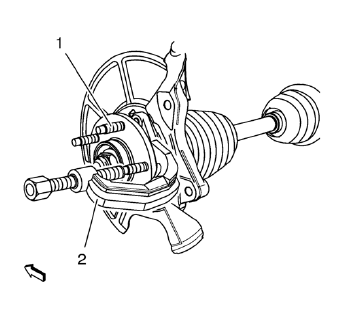
Caution: Support the brake caliper with heavy mechanic wire, or equivalent, whenever it is separated from its mount and the hydraulic flexible brake hose is still connected. Failure to support the caliper in this manner will cause the flexible brake hose to bear the weight of the caliper, which may cause damage to the brake hose and in turn may cause a brake fluid leak.
- Using the CH-43631 remover (2) release the wheel stud (1) from the bearing hub and discard the stud (1).
Installation Procedure
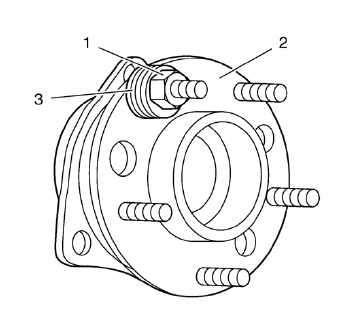
- Install a NEW stud into the bearing/hub assembly (2). Add enough washers (3) in order to draw the stud into the hub.
- Install and tighten a wheel nut (1) until the head of the wheel stud is fully seated against the back of the bearing/hub flange (2).
- Remove the wheel nut (1) and the washers (3).
- Install the brake rotor, and install the brake caliper and bracket as an assembly. Refer to Front Brake Rotor Replacement.
- Install the tire and wheel assembly. Refer to Tire and Wheel Removal and Installation.
- Lower the vehicle.
 Front Lower Control Arm Bushing Replacement
Preliminary Procedure
Raise and support the vehicle. Refer to Lifting and Jacking the
Vehicle.
Remove the tire and wheel. Refer to Tire and Wheel Removal and
Installation.
Remo ...
 Strut Assembly Replacement
Special Tools
CH 49375 Wrench
For equivalent regional tools, refer to Special Tools.
Removal Procedure
Raise and the vehicle. Refer to Lifting and Jacking the Vehicle.
Remove the tire and whe ...
Other materials:
Engine Compartment Fuse Block
To remove the fuse block cover, squeeze the clips and swing it up.
Notice: Spilling liquid on any electrical component on the vehicle
may damage it. Always keep the covers on any electrical component.
Engine Compartment Fuse Block
The vehicle may not be equipped with all of the fuses, relay ...
Rear Side Door Check Replacement
Preliminary Procedure
Remove rear side door trim panel. Refer to Rear Side Door
Trim Replacement
Remove the rear side door water deflector. Refer to Rear Side Door Water
Deflector Replacement
Rear Side Door Check Bolt
Caution: Refer to Fastener Caution in the Pre ...
California Fuel Requirements
If the vehicle is certified to meet California Emissions Standards, it is designed
to operate on fuels that meet California specifications. See the underhood emission
control label. If this fuel is not available in states adopting California Emissions
Standards, the vehicle will operate satisf ...
