
Chevrolet Cruze Repair Manual: Shock Absorber Disposal
Warning: Use the proper eye protection when drilling to prevent metal chips from causing physical injury.
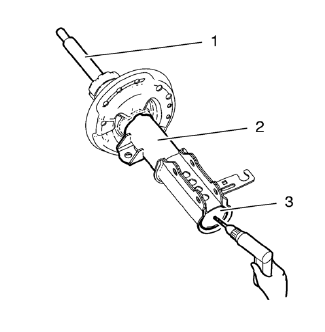
- Clamp the strut in a vise horizontally with the rod ( 1) completely extended.
- Drill a hole in the strut at the center of the end cap (3) using a 5 mm (3/16 in) drill bit. Gas or a gas/oil mixture will exhaust when the drill bit penetrates the strut. Use shop towels in order to contain the escaping oil.
- Remove the strut from the vise.
- Hold the strut over a drain pan vertically with the hole down.
- Move the rod (1) in and out of the tube (2) to completely drain the oil from the strut.
 Strut Assembly Replacement
Special Tools
CH 49375 Wrench
For equivalent regional tools, refer to Special Tools.
Removal Procedure
Raise and the vehicle. Refer to Lifting and Jacking the Vehicle.
Remove the tire and whe ...
 Strut, Strut Component, or Spring Replacement
Special Tools
CH-6068 Spring Tensioner Device
CH-6066 Holding Device
For equivalent regional tools, refer to Special Tools.
Disassembly Procedure
Remove the strut assembly. Refer &n ...
Other materials:
Auxiliary Devices
This vehicle has an auxiliary input jack in the center console. Possible auxiliary
audio sources include:
• Laptop computer
• MP3 player
• Tape player
This jack is not an audio output.
Do not plug headphones into the auxiliary input jack. Set up any auxiliary device
while the vehicle is in ...
Tire Designations
Tire Size
The following is an example of a typical passenger vehicle tire size.
(1) Passenger (P-Metric) Tire: The United States version of a metric tire
sizing system. The letter P as the first character in the tire size means a passenger
vehicle tire engineered to standards set by the U.S. ...
Using the System
The infotainment system is controlled by touching the screen, and by using the
knobs and other buttons.
Voice recognition, through the steering wheel controls, can be used to control
the infotainment features.
Press on the steering wheel controls
to begin voice recognition.
See Voice Recog ...
