
Chevrolet Cruze Owners Manual: When It Is Time for New Tires
Factors such as maintenance, temperatures, driving speeds, vehicle loading, and road conditions affect the wear rate of the tires.
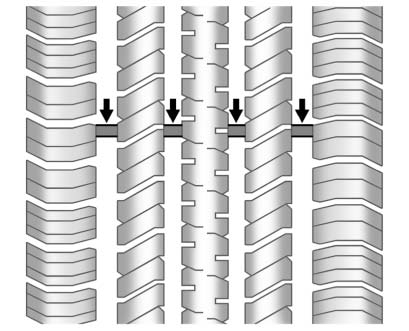
Treadwear indicators are one way to tell when it is time for new tires.
Treadwear indicators appear when the tires have only 1.6mm (1/16 in) or less of tread remaining.
The rubber in tires ages over time.
This also applies to the spare tire, if the vehicle has one, even if it is never used. Multiple factors including temperatures, loading conditions, and inflation pressure maintenance affect how fast aging takes place. GM recommends that tires, including the spare if equipped, be replaced after six years, regardless of tread wear. The tire manufacturer date is the last four digits of the DOT Tire Identification Number (TIN) which is molded into one side of the tire sidewall. The first two digits represent the week (01–52) and the last two digits, the year. For example, the third week of the year 2010 would have a four-digit DOT date of 0310.
Vehicle Storage
Tires age when stored normally mounted on a parked vehicle. Park a vehicle that will be stored for at least a month in a cool, dry, clean area away from direct sunlight to slow aging. This area should be free of grease, gasoline, or other substances that can deteriorate rubber.
Parking for an extended period can cause flat spots on the tires that may result in vibrations while driving. When storing a vehicle for at least a month, remove the tires or raise the vehicle to reduce the weight from the tires.
 Tire Rotation
Tires should be rotated every 12 000 km (7,500 mi).
Tires are rotated to achieve a uniform wear for all tires. The first rotation
is the most important.
Anytime unusual wear is noticed, rotate the ...
 Buying New Tires
GM has developed and matched specific tires for the vehicle. The original equipment
tires installed were designed to meet General Motors Tire Performance Criteria Specification
(TPC Spec) system r ...
Other materials:
Steering Linkage Inner Tie Rod Replacement (Hydraulic Power Steering)
Special Tools
CH-6247 Removal and Installation Tool for the Steering Linkage Inner Tie Rod
For equivalent regional tools, refer to Special Tools.
Removal Procedure
Raise and support the vehicle. Refer to Lifting and Jacking the
Vehicle.
Remove the tire and wheel assembly. Refer to ...
Removal Procedure
Warning: Refer to Approved Equipment for Collision Repair Warning in the
Preface section.
Warning: Refer to Collision Sectioning Warning in the Preface section.
Warning: Refer to Glass and Sheet Metal Handling Warning in the Preface section.
Disable the SIR System. Refer to SIR Dis ...
Bumpers and Fascias
Specifications
Front Bumper Energy Absorber Replacement
Preliminary Procedure
Remove the front bumper fascia. Refer to Front Bumper Fascia Replacement.
Front Bumper Energy Absorber
Procedure
Unclip from front bumper fascia. ...
