
Chevrolet Cruze Repair Manual: Front Side Door Wiring Harness Replacement
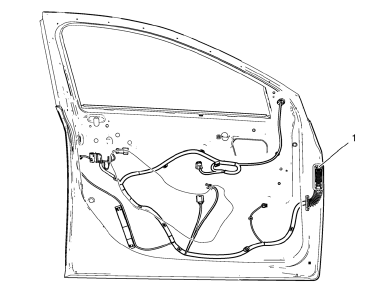
Preliminary Procedure
Remove the front side door inner panel trim. Refer to Front Side Door Trim Replacement.
Front Side Door Wiring Harness
Warning: Unless directed otherwise, the ignition and start switch must be in the OFF or LOCK position, and all electrical loads must be OFF before servicing any electrical component. Disconnect the negative battery cable to prevent an electrical spark should a tool or equipment come in contact with an exposed electrical terminal. Failure to follow these precautions may result in personal injury and/or damage to the vehicle or its components.
For Vehicles equipped with OnStar® (UE1) with Back Up Battery: The Back Up Battery is a redundant power supply to allow limited OnStar® functionality in the event of a main vehicle battery power disruption to the VCIM (OnStar®module). Do not disconnect the main vehicle battery or remove the OnStar® fuse with the ignition key in any position other than OFF. Retained accessory power (RAP) should be allowed to time out or be disabled (simply opening the driver door should disable RAP) before disconnecting power. Disconnecting power to the OnStar® module in any way while the ignition is On or with RAP activated may cause activation of the OnStar® Back-Up Battery (BUB) system and will discharge and permanently damage the back-up battery. Once the Back-Up Battery is activated it will stay on until it has completely discharged. The BUB is not rechargeable and once activated the BUB must be replaced.
Procedure
- Disconnect the battery.
- Remove the water deflector.
- Disconnect electrical connectors as needed.
Rear Compartment Lid Wiring Harness Replacement
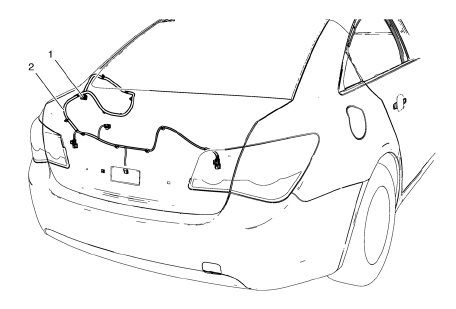
Preliminary Procedure
Remove the rear compartment lid inner panel trim. Refer to Rear Compartment Lid Inner Panel Trim Replacement.
- Rear Compartment Lid Wiring Harness Plug
Procedure
- Disconnect the battery.
- Release the locking device to disconnect the wiring harness plug.
- Rear Compartment Lid Wiring Harness
 Front Fender Replacement
Preliminary Procedure
Remove the front bumper fascia. Refer to Front Bumper Fascia
Replacement
Remove front bumper fascia guide. Refer to Front Bumper Fascia
Replacement
Remove ...
 Rear Side Door Wiring Harness Replacement
Preliminary Procedure
Remove the rear side door inner panel trim. Refer to Rear Side Door Trim
Replacement.
Rear Side Door Wiring Harness
Warning: Unless directed otherwise, the ignition ...
Other materials:
Turn Signal Switch Replacement
Preliminary Procedure
Remove the steering column upper trim cover. Refer to Steering Column
Upper Trim Cover Replacement.
Remove the steering column lower trim cover. Refer to Steering Column
Lower Trim Cover Replacement.
Turn Signal Switch
Procedure
Disconnect any elec ...
Starter Switch Check
WARNING
When you are doing this inspection, the vehicle could move suddenly. If the
vehicle moves, you or others could be injured.
1. Before starting this check, be sure there is enough room around the vehicle.
2. Firmly apply both the parking brake and the regular brake.
Do not use the accele ...
Installation Procedure
Drill 8 mm (5/16 in) for plug welding along the edges of the service
panel as noted from the original panel.
Clean and prepare the attaching surfaces for welding.
Position the roof rear header (1) panel on the vehicle.
Verify the fit of the panel.
Clamp the roof rear header ...
