
Chevrolet Cruze Repair Manual: Installation Procedure
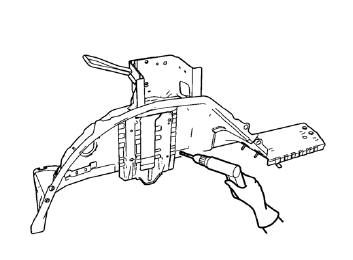
- Drill 8 mm (5/16 in) for plug welding along the edges of the rear inner wheelhouse as noted from the original panel.
Note: If the location of the original plug weld holes can not be determined, space the plug weld holes every 40 mm (1½ in).
- Clean and prepare the attaching surfaces for welding.
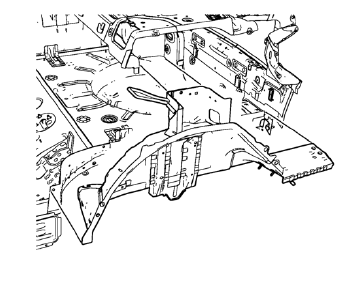
- Position the rear inner wheelhouse on the vehicle.
- Verify the fit of the rear inner wheelhouse.
- Clamp the rear inner wheelhouse into position.
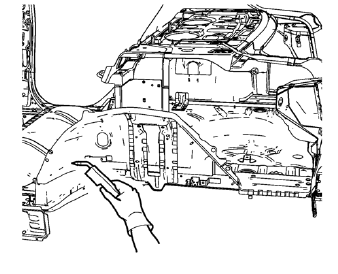
- Plug weld accordingly.
- Apply the sealers and anti-corrosion materials to the repair area, as necessary. Refer to Anti-Corrosion Treatment and Repair.
- Paint the repaired area. Refer to Basecoat/Clearcoat Paint Systems.
- Install all related panels and components.
- Connect the negative battery cable. Refer to Battery Negative Cable Disconnection and Connection.
- Enable the SIR system. Refer to SIR Disabling and Enabling.
 Removal Procedure
Warning: Refer to Approved Equipment for Collision Repair Warning in the
Preface section.
Warning: Refer to Glass and Sheet Metal Handling Warning in the Preface section.
Disable the SIR System. ...
 Rear Wheelhouse Panel Replacement (MIG-Brazing)
Note: According to different corrosion warranties, only the
regional mandatory joining methods are allowed. ...
Other materials:
Rear Side Door Replacement
Preliminary Procedure
Remove the rear side door trim panel. Refer to Rear Side Door Trim
Replacement.
Rear Side Door Check Link Bolt
Caution: Refer to Fastener Caution in the Preface section.
Procedure
Remove the water deflector
Disconnect the door electrical connector.
Suppo ...
Scrapping Procedure
During the course of a vehicle's useful life, certain situations may arise
which will necessitate the disposal of a live (undeployed)
pretensioner. The following information covers the proper procedures for the
disposing of a live (undeployed) pretensioner. Deploy the
pretensioner before dispo ...
Wheel Stud Replacement
Removal Procedure
Raise and suitably support the vehicle. Refer to Lifting and
Jacking the Vehicle.
Remove the tire and wheel assembly. Refer to Tire and Wheel Removal and
Installation.
Remove the wheel bearing/hub. Refer to Rear Wheel Bearing and Hub
Replacement.
Cauti ...
