
Chevrolet Cruze Repair Manual: Removal Procedure
Warning: Refer to Approved Equipment for Collision Repair Warning in the Preface section.
Warning: Refer to Glass and Sheet Metal Handling Warning in the Preface section.
Disable the SIR System. Refer to SIR Disabling and Enabling.
- Disconnect the negative battery cable. Refer to Battery Negative Cable Disconnection and Connection.
- Remove all related panels and components.
- Visually inspect the damage. Repair as much of the damage as possible.
- Remove the sealers and anti-corrosion materials from the repair area, as necessary. Refer to Anti-Corrosion Treatment and Repair.
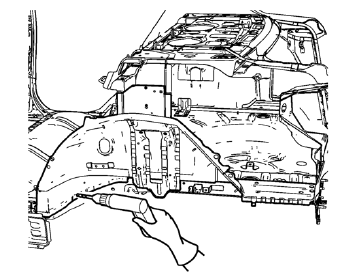
- Locate and mark all the necessary factory welds of the rear inner wheelhouse.
Note: Note the number and location of welds for installation of the service assembly.
- Drill all factory welds.
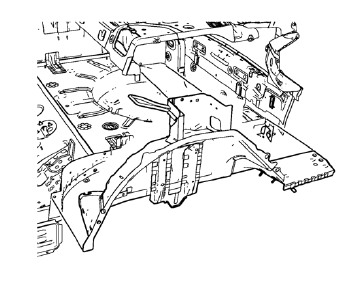
- Remove the rear inner wheelhouse.
 Rear Wheelhouse Panel Replacement (MAG-Welding)
Note: According to different corrosion warranties, only the
regional mandatory joining methods are allowed. ...
 Installation Procedure
Drill 8 mm (5/16 in) for plug welding along the edges of the rear inner
wheelhouse as noted from the original panel.
Note: If the location of the original plug weld holes can not be
det ...
Other materials:
Reporting Safety Defects to the United States Government
If you believe that your vehicle has a defect which could cause a crash or could
cause injury or death, you should immediately inform the National Highway Traffic
Safety Administration (NHTSA) in addition to notifying General Motors.
If NHTSA receives similar complaints, it may open an investig ...
Reclining Seatbacks
WARNING
If either seatback is not locked, it could move forward in a sudden stop or
crash. That could cause injury to the person sitting there.
Always push and pull on the seatbacks to be sure they are locked.
To recline the seatback:
1. Lift the lever.
If necessary, move the safety belt ou ...
Intermediate Steering Shaft Replacement
Removal Procedure
Turn the steering wheel to the straight forward position and support it
from movement
Remove the 2 intermediate steering shaft bolts (1).
Remove the intermediate steering shaft (1).
Installation Procedure
Install the intermediate steering shaft ...
