
Chevrolet Cruze Repair Manual: Installation Procedure
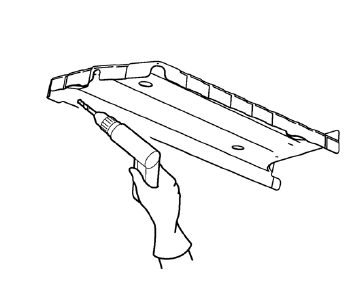
Note: If the location of the original plug weld holes can not be determined, space the plug weld holes every 40 mm (1½ in).
- Drill 8 mm (5/16 in) for plug welding along the edges of the rear floor panel filler as noted from the original panel.
- Clean and prepare the attaching surfaces for welding.
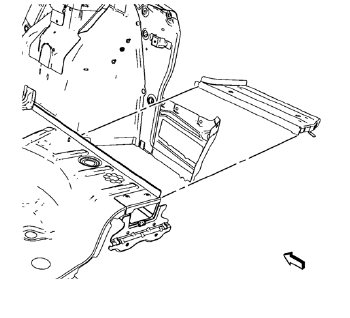
- Position the rear floor panel filler on the vehicle.
- Verify the fit of the rear floor panel filler.
- Clamp the rear floor panel filler into position.
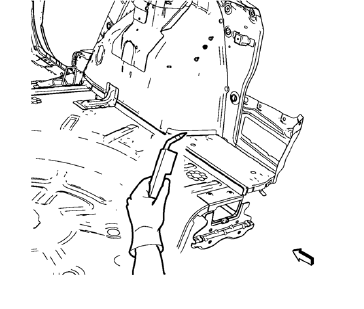
- Plug weld accordingly.
- Apply the sealers and anti-corrosion materials to the repair area, as necessary. Refer to Anti-Corrosion Treatment and Repair.
- Paint the repaired area. Refer to Basecoat/Clearcoat Paint Systems.
- Install all related panels and components.
- Connect the negative battery cable. Refer to Battery Negative Cable Disconnection and Connection.
- Enable the SIR system. Refer to SIR Disabling and Enabling.
 Removal Procedure
Warning: Refer to Approved Equipment for Collision Repair Warning in the
Preface section.
Warning: Refer to Glass and Sheet Metal Handling Warning in the Preface section.
Disable the SIR Syst ...
 Rear Floor Panel Filler Replacement (MIG-Brazing)
Note: According to different corrosion warranties, only the
regional mandatory joining methods are allowed. ...
Other materials:
StabiliTrak® System
The vehicle has a vehicle stability enhancement system called StabiliTrak. It
is an advanced computer controlled system that assists with directional control
of the vehicle in difficult driving conditions.
StabiliTrak activates when the computer senses a difference between the intended
path, ...
Steering Wheel Controls
For vehicles with audio steering wheel controls, some audio controls can be adjusted
at the steering wheel.
(Push to Talk): For vehicles with
a Bluetooth, OnStar, or navigation system, press to interact with those systems.
(Mute/End Call): Press to silence
the vehicle speakers only.
Pre ...
New Vehicle Break-In
Notice: The vehicle does not need an elaborate break-in. But it will
perform better in the long run if you follow these guidelines:
• Do not drive at any one constant speed, fast or slow, for the first 805 km (500
mi).
Do not make full-throttle starts. Avoid downshifting to brake or slow the v ...
