
Chevrolet Cruze Repair Manual: Removal Procedure
Warning: Refer to Approved Equipment for Collision Repair Warning in the Preface section.
Warning: Refer to Glass and Sheet Metal Handling Warning in the Preface section.
- Disable the SIR System. Refer to SIR Disabling and Enabling.
- Disconnect the negative battery cable. Refer to Battery Negative Cable Disconnection and Connection.
- Remove all related panels and components.
- Visually inspect the damage. Repair as much of the damage as possible.
- Remove the sealers and anti-corrosion materials from the repair area, as necessary. Refer to Anti-Corrosion Treatment and Repair.
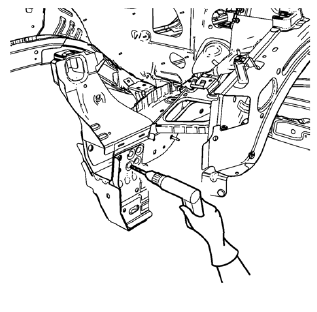
- Locate and mark all the necessary factory welds and weld seams of the drivetrain and front suspension frame front support.
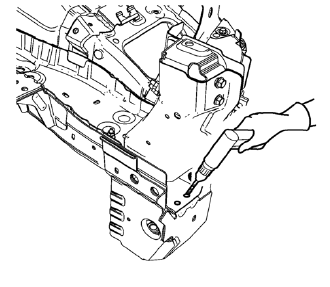
- Drill out front flange of front suspension support frame from above through the front compartment side rail.
Note: Create slots for MIG-Brazing out of drill holes.
- Drill all factory welds. Note the number and location of welds for installation of the service assembly.
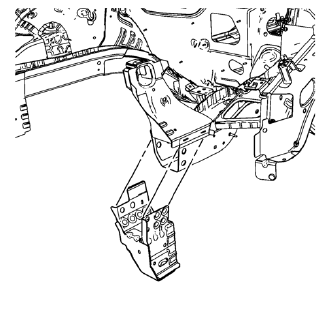
- Remove the drivetrain and front suspension frame front support.
 Drivetrain and Front Suspension Frame Front Support Replacement (MIG-Brazing)
Note: According to different corrosion warranties, only the
regional mandatory joining methods are allowed. ...
 Installation Procedure
Create 8 x 14 mm (5/16 x 15/16 in) slots for MIG-Brazing along the edges
of the drivetrain and front suspension frame front support
as noted from the original panel.
Clean and prepare th ...
Other materials:
Removal Procedure
Warning: Refer to Approved Equipment for Collision Repair Warning in the
Preface section.
Warning: Refer to Glass and Sheet Metal Handling Warning in the Preface section.
Disable the SIR System. Refer to SIR Disabling and Enabling.
Disconnect the negative battery cable. Refer to Battery N ...
Tire Sidewall Labeling
Useful information about a tire is molded into its sidewall. The examples show
a typical passenger vehicle tire and a compact spare tire sidewall.
Passenger (P-Metric) Tire Example
(1) Tire Size: The tire size is a combination of letters and numbers used
to define a particular tire's wid ...
Turn Signal Switch Replacement
Preliminary Procedure
Remove the steering column upper trim cover. Refer to Steering Column
Upper Trim Cover Replacement.
Remove the steering column lower trim cover. Refer to Steering Column
Lower Trim Cover Replacement.
Turn Signal Switch
Procedure
Disconnect any elec ...
