
Chevrolet Cruze Repair Manual: Removal Procedure
Warning: Refer to Approved Equipment for Collision Repair Warning in the Preface section.
Warning: Refer to Glass and Sheet Metal Handling Warning in the Preface section.
- Disable the SIR System. Refer to SIR Disabling and Enabling.
- Disconnect the negative battery cable. Refer to Battery Negative Cable Disconnection and Connection.
- Remove all related panels and components.
- Visually inspect the damage. Repair as much of the damage as possible.
- Remove the sealers and anti-corrosion materials from the repair area, as necessary. Refer to Anti-Corrosion Treatment and Repair;
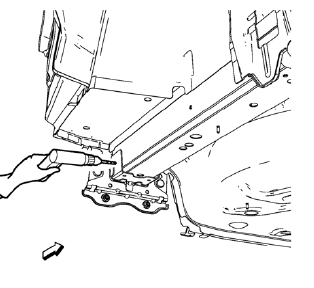
- Locate and mark all the necessary factory welds of the rear end panel plate.
Note: Note the number and location of welds for installation of the service assembly.
- Drill all factory welds.
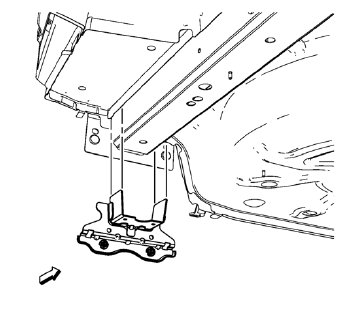
- Remove the underbody rear side rail reinforcement
 Underbody Rear Side Rail Reinforcement Replacement (MIG-Brazing)
Note: According to different corrosion warranties, only the
regional mandatory joining methods are allowed. ...
 Installation Procedure
Create 8 24 mm (5/16 x 15/16 in) slots for MIG-brazing along the edges
of the underbody rear side rail reinforcement as noted from
the original panel.
Clean and prepare the attaching&nb ...
Other materials:
Engine Cooling System Messages
A/C OFF DUE TO HIGH ENGINE TEMP
This message displays when the engine coolant becomes hotter than the normal
operating temperature.
To avoid added strain on a hot engine, the air conditioning compressor automatically
turns off.
When the coolant temperature returns to normal, the air condition ...
Definition of Danger, Warning, Caution, and Note
The diagnosis and repair procedures in a GM Service Manual contain both
general and specific Dangers, Warnings, Cautions, Notes or
Importants. GM is dedicated to the presentation of service information that
helps the technician to diagnose and repair the systems
necessary for the proper operat ...
Repairs and Inspections Required After a Collision
Warning: Restraint systems can be damaged in a collision. To help
avoid injury and ensure that all parts in need of replacement are
replaced:
Replace any seat belt system that was in use during the
collision serious enough to deploy any automatic restraint device such as
air
bags and ...
