
Chevrolet Cruze Repair Manual: Front Bumper Impact Bar Replacement
Removal Procedure
Warning: Refer to Approved Equipment for Collision Repair Warning in the Preface section.
Warning: Refer to Glass and Sheet Metal Handling Warning in the Preface section.
- Disable the SIR System. Refer to SIR Disabling and Enabling.
- Disconnect the negative battery cable. Refer to Battery Negative Cable Disconnection and Connection.
- Remove all related panels and components.
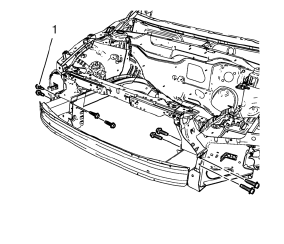
- Remove the 8 front bumper impact bar bolts (1).
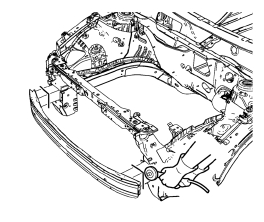
- Cut the front bumper impact bar left and right.
- Locate and mark all factory welds.
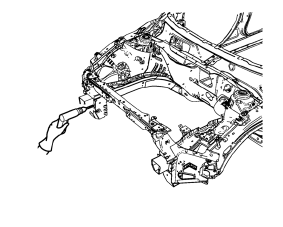
- Drill all factory welds.
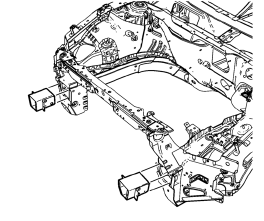
- Remove the remaining parts of 8. the front bumper impact bar.
Installation Procedure
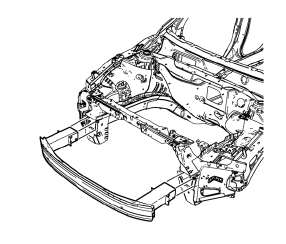
- Position the front bumper impact bar on the vehicle.
Caution: Refer to Fastener Caution in the Preface section.
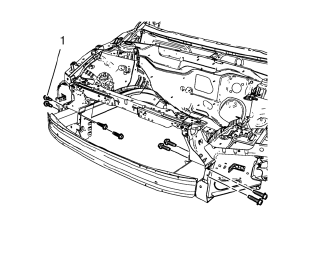
- Install the 8 front bumper impact bar bolts (1) and tighten to 110 N·m (81 lb ft).
Note: Use only the original front bumper impact bar bolts. Replace bolts if damaged.
- Paint the repaired area. Refer to Basecoat/Clearcoat Paint Systems.
- Install all related panels and components.
- Connect the negative battery cable. Refer to Battery Negative Cable Disconnection and Connection.
- Enable the SIR system. Refer to SIR Disabling and Enabling.
 Overlap/Backing Plate Sectioning (Welding)
Warning: Refer to Approved Equipment for Collision Repair Warning in
the Preface section.
Fit the service panel to the vehicle to ensure a proper fit.
Measure and mark a line at th ...
 Headlamp Mount Panel Replacement (MAG-Welding)
Note: According to different corrosion warranties, only the
regional mandatory joining methods are allowed.
Removal Procedure
Warning: Refer to Approved Equipment for Collision Repair Warning in t ...
Other materials:
Installation Procedure
Align the front side door outer panel.
Verify the fit of the front side door outer panel.
Clamp the front side door outer panel
into position.
Pre-flanging the flange with BO-6396 pliers and BO-6392 tool kit .
Continue to hammer in stages along the hem flanges.
...
Instrument Panel and Console Trim
Specifications
Instrument Panel Insulator Seal Replacement
Preliminary Procedure
Remove the instrument panel assembly. Refer to Instrument Panel Assembly
Replacement.
Instrument Panel Insulator Seal
Steering Column Upper Trim Cover Replacement
Preliminary Procedure
Remo ...
Driver Information Center (DIC)
The DIC display is in the center of the instrument cluster. It shows the status
of many vehicle systems. The controls for the DIC are on the turn signal lever.
1. SET/CLR: Press to set, or press and hold to clear, the menu item displayed.
2. /
: Use the thumbwheel to scroll through
the it ...
