
Chevrolet Cruze Repair Manual: Headlamp Mount Panel Replacement (MAG-Welding)
Note: According to different corrosion warranties, only the regional mandatory joining methods are allowed.
Removal Procedure
Warning: Refer to Approved Equipment for Collision Repair Warning in the Preface section.
Warning: Refer to Glass and Sheet Metal Handling Warning in the Preface section.
- Disable the SIR System. Refer to SIR Disabling and Enabling.
- Disconnect the negative battery cable. Refer to Battery Negative Cable Disconnection and Connection.
- Remove all related panels and components.
- Visually inspect the damage. Repair as much of the damage as possible.
- Remove the sealers and anti-corrosion materials from the repair area, as necessary. Refer to Anti-Corrosion Treatment and Repair.
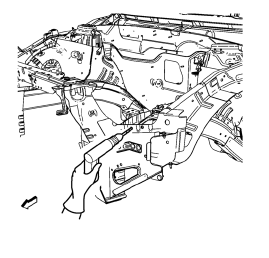
- Locate and mark all the necessary factory welds of the headlamp mount panel.
- Drill all factory welds. Note the number and location of welds for installation of the service assembly.
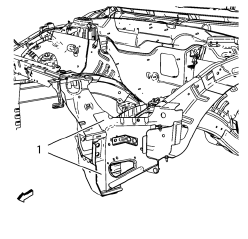
- Cut the adhesive (1) with an appropriate tool.
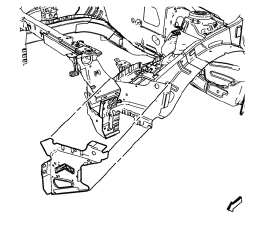
- Remove the headlamp mount panel.
Installation Procedure
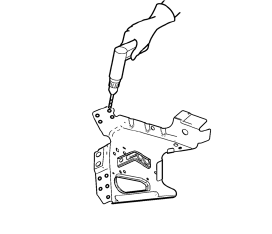
- Drill 8 mm (5/16 in) for plug welding instead of the adhesive noted from the original panel.
- Drill 8 mm (5/16 in) for plug welding along the edges of the headlamp mount panel as noted from the original panel.
- Clean and prepare the attaching surfaces for welding.
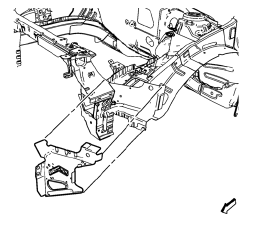
- Position the headlamp mount panel on the vehicle.
- Verify the fit of the headlamp mount panel.
- Clamp the headlamp mount panel into position.
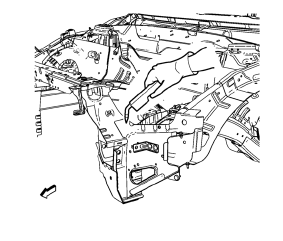
- Plug weld accordingly.
- Apply the sealers and anti-corrosion materials to the repair area, as necessary. Refer to Anti-Corrosion Treatment and Repair.
- Paint the repaired area. Refer to Basecoat/Clearcoat Paint Systems.
- Install all related panels and components.
- Connect the negative battery cable. Refer to Battery Negative Cable Disconnection and Connection.
- Enable the SIR system. Refer to SIR Disabling and Enabling.
 Front Bumper Impact Bar Replacement
Removal Procedure
Warning: Refer to Approved Equipment for Collision Repair Warning in the
Preface section.
Warning: Refer to Glass and Sheet Metal Handling Warning in the Preface section.
D ...
 Headlamp Mount Panel Replacement (MIG-Brazing)
Note: According to different corrosion warranties, only the
regional mandatory joining methods are allowed.
Removal Procedure
Warning: Refer to Approved Equipment for Collision Repair Warning in t ...
Other materials:
Reporting Safety Defects to General Motors
In addition to notifying NHTSA (or Transport Canada) in a situation like this,
notify General Motors.
Call 1-800-222-1020, or write:
Chevrolet Motor Division
Chevrolet Customer Assistance
Center
P.O. Box 33170
Detroit, MI 48232-5170
In Canada, call 1-800-263-3777
(English) or 1-800-263-785 ...
Rear Bumper Impact Bar Replacement
Preliminary Procedure
Remove the rear bumper fascia. Refer to Rear Bumper Fascia Replacement.
Rear Bumper Energy Absorber Nut (Qty: 6)
Caution: Refer to Fastener Caution in the Preface section.
Tighten
40 N·m (30 lb ft)
Rear Bumper Impact Bar
Special Tools and Equipment
...
Automatic Transmission
It is better not to park with the engine running.
If the vehicle is left with the engine running, follow the proper steps to be
sure the vehicle will not move.
If parking on a hill and pulling a trailer.
The automatic transmission has a shift lever located on the console between the
seats.
...
