
Chevrolet Cruze Repair Manual: Front Side Door Replacement
Preliminary Procedure
Remove the front side door trim panel. Refer to Front Side Door Trim Replacement.
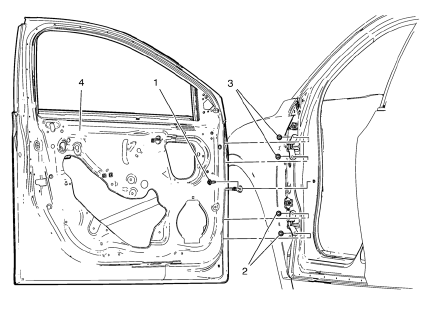
- Front Side Door Check Link Bolt
Caution: Refer to Fastener Caution in the Preface section.
Procedure
- Remove the water deflector.
- Disconnect the door electrical connector.
- Support the door before removing the hinge bolts.
- With the aid of an assistant, remove the door.
Tighten 25 N·m (18 lb ft)
- Front Side Door Lower Hinge Bolt (Qty: 2)
Tighten 25 N·m (18 lb ft)
- Front Side Door Upper Hinge Bolt (Qty: 2)
Tighten 25 N·m (18 lb ft)
- Front Side Door
Procedure
- Transfer all of the internal components.
- Adjust the front side door as needed. Refer to Front Side Door Adjustment.
 Front Side Door Adjustment
Preliminary Procedure
Remove the front wheelhouse liner. Refer to Front Wheelhouse Liner
Replacement.
Front Side Door
Caution: Refer to Fastener Caution in the Preface section.
Procedure
...
 Rear Side Door Adjustment
Rear Side Door
Caution: Refer to Fastener Caution in the Preface section.
Procedure
Loosen the rear door hinge bolt (Qty: 4) to adjust the rear door.
Adjust the rear door in order to ...
Other materials:
Horns
Specifications
Horn Replacement
Preliminary Procedure
Remove the front bumper fascia. Refer to Front Bumper Fascia Replacement.
Horn Nut
Caution: Refer to Fastener Caution in the Preface section.
Tighten
17 N·m (13 lb ft)
Horn
Tip
Disconnect electrical connectors.
St ...
Center Console Storage
The center console storage has a storage area under the armrest. Pull up on the
latch on the front of the armrest to access.
Pull up on the latch and slide the center console armrest to adjust the position.
Return the armrest to the rear position to access the storage area.
There may be an a ...
Traction Off Light
This light comes on briefly while starting the engine. If it does not, have the
vehicle serviced by your dealer. If the system is working normally, the indicator
light then turns off.
The traction off light comes on when the Traction Control System (TCS) has been
turned off by pressing and ...
