
Chevrolet Cruze Repair Manual: Front Side Door Window Weatherstrip Replacement
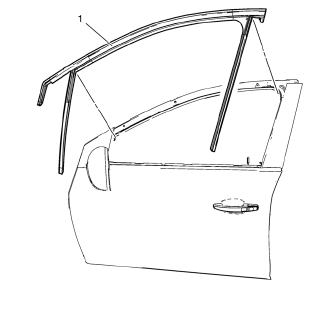
Preliminary Procedure
- Remove the outside rearview mirror. Refer to Outside Rearview Mirror Replacement.
- Remove the front side door window frame rear cover. Refer to Front Side Door Window Frame Rear Cover Replacement.
Front Side Door Window Weatherstrip
Procedure
Pull the front side door window weatherstrip away from the outer window flange to remove.
Rear Side Door Window Weatherstrip Replacement
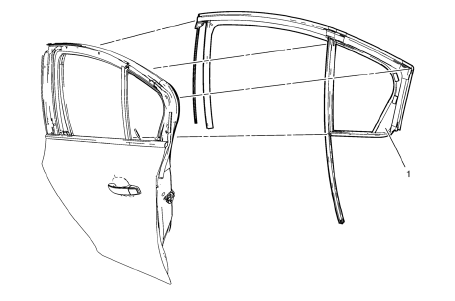
Preliminary Procedure
- Remove the rear side door stationary window. Refer to Rear Side Door Stationary Window Replacement
- Remove the rear side door window frame front cover. Refer to Rear Side Door Window Frame Front Cover Replacement.
Rear Side Door Window Weatherstrip
Procedure
Pull the rear side door window weatherstrip away from the outer window flange to remove.
Adhesive Service Kit Description
Use the urethane adhesive for replacement of any urethane adhesive-installed windows.
Use these materials based on specific manufacturer.
Do NOT intermix primers or adhesives from one manufacturer to another.
Always follow the system manufacturer's instructions for application, handling, and curing.
 Rear Side Door Window Outer Sealing Strip Replacement
Rear Side Door Window Outer Sealing Strip Assembly
...
 Power Windows Description and Operation
Power Windows System Components
The power window system consists of the following components:
Driver window switch
Passenger window switch
Left rear window switch
Right rear window switch
...
Other materials:
Overheated Engine Protection Operating Mode
This emergency operating mode allows the vehicle to be driven to a safe place
in an emergency situation. If an overheated engine condition exists, an overheat
protection mode which alternates firing groups of cylinders helps prevent engine
damage. In this mode, a significant loss in power and ...
Shock Absorber Replacement
Removal Procedure
Raise and suitably support the vehicle. Refer to Lifting and
Jacking the Vehicle.
Remove the tire and wheel assembly. Refer to Tire and Wheel Removal and
Installation.
Support the rear axle with a tall jack stand near the shock absorber.
Remove the upp ...
Installation Procedure
Remove rear end upper panel extension (1) from service part.
Cut
Cut the body side inner panel in corresponding locations to fit the
remaining original panel. The sectioning joint should be trimmed to
allow a gap of one-and-one-half-times the metal thickness at the sectioni ...
