
Chevrolet Cruze Repair Manual: Headlamp Replacement
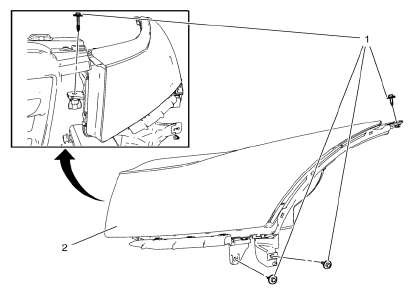
Preliminary Procedure
Remove the front bumper fascia upper bracket. Refer to Front Bumper Fascia Replacement.
- Headlamp Screw (Qty: 4)
Caution: Refer to Fastener Caution in the Preface section.
Tip
Secure the headlamp fasteners in sequence, as indicated.
Tighten 2.5 N·m (22 lb in)
- Headlamp Assembly
Procedure
- Pull forward on the outside edge of the headlamp in order to release the up and down locator tabs on the backside of the headlamp.
- Pull forward on the top inside edge of the headlamp to release the inboard up/down locator.
- Pull the headlamp assembly down.
- Pull the headlamp assembly forward far enough to access the electrical connection.
- Disconnect the headlamp electrical connector from the forward lamp harness connector.
- Remove the headlamp assembly.
- Aim the headlamps after installation. Refer to Headlamp Aiming.
Headlamp Bulb Replacement
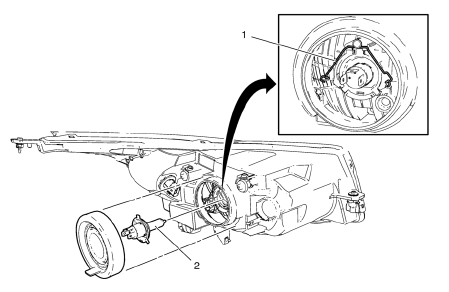
Preliminary Procedure
Remove the headlamp bulb dust cover.
- Headlamp Bulb Socket Bracket
Tip
Disconnect electrical connector.
- Headlamp Bulb
Warning: Refer to Halogen Bulb Warning in the Preface section.
Procedure
Remove the bulb from the lamp socket.
 Brake Pedal Position Sensor Calibration
Calibration Criteria
Note: Do not apply the brake pedal during the brake pedal position
(BPP) sensor calibration procedure. Any movement of the brake pedal
during this procedure will cause the cal ...
 Headlamp Aiming
...
Other materials:
Overview
Read the following pages to become familiar with the infotainment system features.
WARNING
Taking your eyes off the road for extended periods could cause a crash resulting
in injury or death to you or others. Do not give extended attention to infotainment
tasks while driving.
The infotainment ...
Recreational Vehicle Towing
Recreational vehicle towing refers to towing the vehicle behind another vehicle
– such as behind a motor home. The two most common types of recreational vehicle
towing are known as dinghy towing and dolly towing. Dinghy towing is towing the
vehicle with all four wheels on the ground. Dolly tow ...
Frontal SIR System Description
The frontal supplemental inflatable restraint (SIR) system consists of the
following components:
AIR BAG indicator located in the instrument cluster
Inflatable restraint sensing and diagnostic module (SDM)
Inflatable restraint passenger presence detection system
Inflatable restraint Pass ...
