
Chevrolet Cruze Repair Manual: Installation Procedure
- Align the body side outer panel reinforcement.
- Clean and prepare the attaching surfaces for welding.
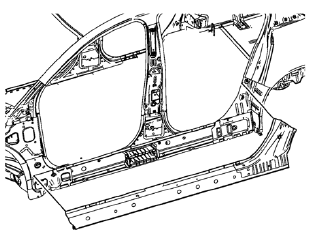
- Position the body side outer panel reinforcement on the vehicle.
- Verify the fit of the body side outer panel reinforcement.
- Clamp the body side outer panel reinforcement into position.
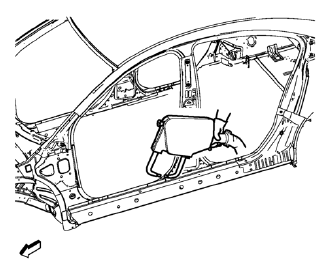
- Spot weld accordingly.
- Apply the sealers and anti-corrosion materials to the repair area, as necessary. Refer to Anti-Corrosion Treatment and Repair.
- Paint the repaired area. Refer to Basecoat/Clearcoat Paint Systems.
- Install all related panels and components.
- Connect the negative battery cable. Refer to Battery Negative Cable Disconnection and Connection.
- Enable the SIR system. Refer to SIR Disabling and Enabling.
 Removal Procedure
Warning: Refer to Approved Equipment for Collision Repair Warning in the
Preface section.
Warning: Refer to Collision Sectioning Warning in the Preface section.
Warning: Refer to Glass and She ...
 Body Side Inner Panel Sectioning (MAG-Welding)
Note: According to different corrosion warranties, only the
regional mandatory joining methods are allowed. ...
Other materials:
Warning Lights, Gauges, and Indicator
Warning lights and gauges can signal that something is wrong before it becomes
serious enough to cause an expensive repair or replacement. Paying attention to
the warning lights and gauges could prevent injury.
Warning lights come on when there could be a problem with a vehicle function.
Some ...
Automatic Headlamp System
When it is dark enough outside and the exterior lamp control is in the automatic
position, the headlamps come on automatically.
The vehicle has a light sensor on top of the instrument panel. Make sure it is
not covered, or the headlamps will be on when they are not needed.
The system may als ...
Instrument Panel Cluster Lower Trim Plate Replacement
Preliminary Procedure
Remove instrument panel cluster trim plate. Refer to Instrument Panel Cluster
Trim Plate Replacement.
Instrument Panel Cluster Lower Trim Plate Screw (Qty: 4)
Caution: Refer to Fastener Caution in the Preface section.
Tighten
2.5 N·m (23 lb in)
Instrument Pa ...
