
Chevrolet Cruze Repair Manual: Removal Procedure
Warning: Refer to Approved Equipment for Collision Repair Warning in the Preface section.
Warning: Refer to Collision Sectioning Warning in the Preface section.
Warning: Refer to Glass and Sheet Metal Handling Warning in the Preface section.
- Disable the SIR System. Refer to SIR Disabling and Enabling.
- Disconnect the negative battery cable. Refer to Battery Negative Cable Disconnection and Connection.
- Remove all related panels and components.
- Visually inspect the damage. Repair as much of the damage as possible.
- Remove the sealers and anti-corrosion materials from the repair area, as necessary. Refer to Anti-Corrosion Treatment and Repair.
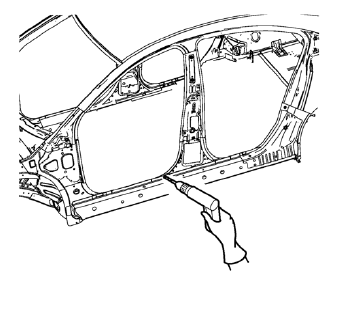
- Locate and mark all the necessary factory welds of the body side outer panel reinforcement.
- Drill all factory welds. Note the number and location of welds for installation of the service assembly.
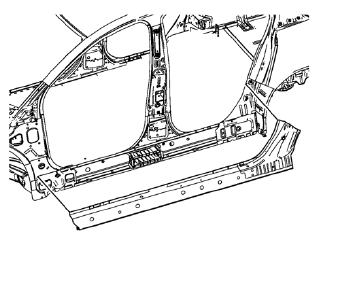
- Remove the damaged body side outer panel reinforcement.
 Body Side Outer Panel Reinforcement Replacement (MIG-Brazing)
Note: According to different corrosion warranties, only the
regional mandatory joining methods are allowed. ...
 Installation Procedure
Align the body side outer panel reinforcement.
Clean and prepare the attaching surfaces for welding.
Position the body side outer panel
reinforcement on the vehicle.
Verify ...
Other materials:
Introduction
The names, logos, emblems, slogans, vehicle model names, and vehicle body designs
appearing in this manual including, but not limited to, GM, the GM logo, CHEVROLET,
the CHEVROLET Emblem, and CRUZE are trademarks and/or service marks of General Motors
LLC, its subsidiaries, affiliates, or li ...
Auxiliary Devices
This vehicle has an auxiliary input jack in the center console. Possible auxiliary
audio sources include:
• Laptop computer
• MP3 player
• Tape player
This jack is not an audio output.
Do not plug headphones into the auxiliary input jack. Set up any auxiliary device
while the vehicle is in ...
Instrument Panel Wiring Harness Replacement
Removal Procedure
Remove instrument panel compartment assembly. Refer to Instrument
Panel Compartment Replacement.
Remove instrument panel wiring harness (2) from instrument panel tie bar
(1).
Disconnect electrical connectors.
Installation Procedure
Ins ...
