
Chevrolet Cruze Owners Manual: Reading Lamps
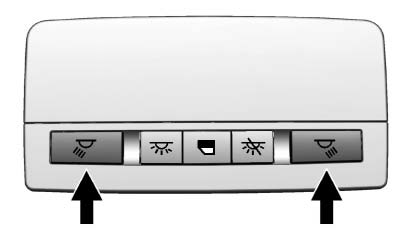
The reading lamps are in the overhead console.
 or
or
 : Press the button near each lamp to
turn it on or off.
: Press the button near each lamp to
turn it on or off.
 Dome Lamps
The dome lamp controls are in the headliner.
(Dome Lamp Override): Press
to turn the lamps off, even when a door is open.
(Door): Press to turn the
lamps on automatically when a door is open ...

Other materials:
Shifting Into Park
Use this procedure to shift into P (Park):
1. Hold the brake pedal down and set the parking brake.
2. Hold the button on the shift lever and push the lever toward the front of the
vehicle into P (Park).
3. Turn the ignition to LOCK/OFF.
Leaving the Vehicle with the Engine Running
WARNING
It ...
Body Side Trim Panel Replacement - Left Side
Preliminary Procedure
Remove the rear side door sill trim plate. Refer to Rear Side Door Sill
Trim Plate Replacement.
Remove the rear seat back. Refer to Rear Seat Replacement.
Remove the quarter window garnish molding. Refer to Quarter Window
Garnish Molding Replacement.
...
Removal Procedure
Remove the drivetrain and front suspension frame. Refer to Drivetrain
and Front Suspension Frame Replacement.
Mark Installation position of insulator (2) at frame (1).
Cut out frame insulator core (1) from frame insulator (2).
Note: On the rear insulator dril ...
