
Chevrolet Cruze Repair Manual: Rear Compartment Lid Replacement
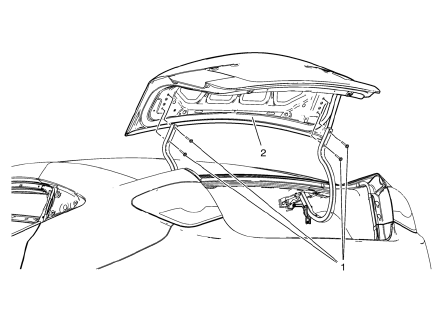
Preliminary Procedure
Remove the rear compartment lid inner panel trim. Refer to Rear Compartment Lid Inner Panel Trim Replacement.
- Rear Compartment Lid Hinge Bolt (Qty: 4)
Caution: Refer to Fastener Caution in the Preface section.
Tighten 9 N·m (80 lb ft)
- Rear Compartment Lid
Procedure
- Disconnect the electrical connector.
- Adjust rear compartment as needed. Refer to Rear Compartment Lid Adjustment.
- Transfer components as necessary.
 Rear Compartment Lid Adjustment
Rear Compartment Lid
Caution: Refer to Fastener Caution in the Preface section.
Procedure
Loosen the rear compartment lid hinge bolt (Qty: 4) to
adjust the rear compartment li ...
 Front Side Door Check Replacement
Prliminary Procedure
Remove front side door trim panel. Refer to Front Side Door Trim
Replacement
Remove the front side door water deflector. Refer to Front Side Door
Water Defle ...
Other materials:
Installation Procedure
Install the following components on the drivetrain and front suspension
frame if removed:
The radiator support brackets.
The stabilizer shaft--Refer to Stabilizer Shaft Replacement.
The lower control arms--Refer to Lower Control Arm Replacement.
The steering gear--Refer to Steering ...
Reclining Seatbacks
WARNING
If either seatback is not locked, it could move forward in a sudden stop or
crash. That could cause injury to the person sitting there.
Always push and pull on the seatbacks to be sure they are locked.
To recline the seatback:
1. Lift the lever.
If necessary, move the safety belt ou ...
Safety Belt Use During Pregnancy
Safety belts work for everyone, including pregnant women. Like all occupants,
they are more likely to be seriously injured if they do not wear safety belts.
A pregnant woman should wear a lap-shoulder belt, and the lap portion should
be worn as low as possible, below the rounding, throughout ...
