
Chevrolet Cruze Repair Manual: Rear Side Door Replacement
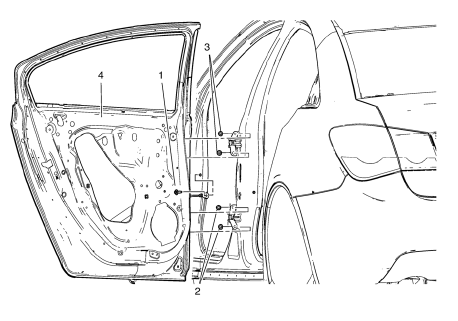
Preliminary Procedure
- Remove the rear side door trim panel. Refer to Rear Side Door Trim Replacement.
Rear Side Door Check Link Bolt Caution: Refer to Fastener Caution in the Preface section.
Procedure
- Remove the water deflector
- Disconnect the door electrical connector.
- Support the door before removing the hinge bolts
- With the aid of an assistant, remove the door.
Tighten 25 N·m (18 lb ft)
- Rear Side Door Lower Hinge Bolt (Qty: 2)
Tighten 25 N·m (18 lb ft)
- Rear Side Door Upper Hinge Bolt (Qty: 2)
Tighten 25 N·m (18 lb ft)
- Rear Side Door
Procedure
- Transfer all of the internal components.
- Adjust the rear side door as needed. Refer to Rear Side Door Adjustment.
 Rear Side Door Adjustment
Rear Side Door
Caution: Refer to Fastener Caution in the Preface section.
Procedure
Loosen the rear door hinge bolt (Qty: 4) to adjust the rear door.
Adjust the rear door in order to ...
 Front Fender Replacement
Preliminary Procedure
Remove the front bumper fascia. Refer to Front Bumper Fascia
Replacement
Remove front bumper fascia guide. Refer to Front Bumper Fascia
Replacement
Remove ...
Other materials:
Low-Profile Tires
If the vehicle has P225/45R18 size tires, they are classified as low‐profile
tires. These tires are designed for very responsive driving on wet or dry pavement,
however, may produce more road noise and tend to wear faster.
Notice: Low-profile tires are more susceptible to damage from road ...
Checking and Adding Power Steering Fluid
Caution: When adding fluid or making a complete fluid change, always
use the proper power steering fluid. Failure to use the proper fluid
will cause hose and seal damage and fluid leaks.
Clean the area surrounding the reservoir cap.
Remove the reservoir cap.
Inspect the power steeri ...
Rear Side Door Upper Hinge and Lower Hinge Replacement
Preliminary Procedure
Remove the rear side door. Refer to Rear Side Door Replacement.
Rear Side Door Hinge Bolt (Qty: 4)
Caution: Refer to Fastener Caution in the Preface section.
Tighten
25 N·m (19 lb ft)
Reart Side Door Hinge
Procedure
Adjust rear side door as needed. Refer ...
