
Chevrolet Cruze Repair Manual: Removal Procedure
Warning: Refer to Approved Equipment for Collision Repair Warning in the Preface section.
Warning: Refer to Collision Sectioning Warning in the Preface section.
Warning: Refer to Glass and Sheet Metal Handling Warning in the Preface section.
- Disable the SIR System. Refer to SIR Disabling and Enabling.
- Disconnect the negative battery cable. Refer to Battery Negative Cable Disconnection and Connection.
- Remove all related panels and components.
- Visually inspect the damage. Repair as much of the damage as possible.
- Remove the sealers and anti-corrosion materials from the repair area, as necessary. Refer to Anti-Corrosion Treatment and Repair.
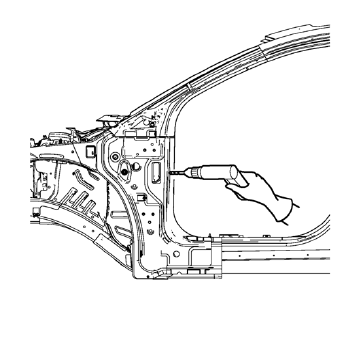
- Locate and mark all the necessary factory welds of the front hinge pillar body.
- Drill all factory welds. Note the number and location of welds for installation of the service assembly.
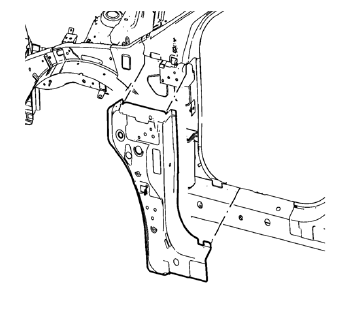
- Remove the damaged front hinge pillar body reinforcement.
 Body Hinge Pillar Lower Reinforcement Replacement (MAG-Welding)
Note: According to different corrosion warranties, only the
regional mandatory joining methods are allowed. ...
 Installation Procedure
Prepare all mating surfaces as necessary.
Align the front hinge pillar body reinforcement.
Drill 8 mm (5/16 in) for plug welding along the edges of the front hinge
pillar body as not ...
Other materials:
Driving on Wet Roads
Rain and wet roads can reduce vehicle traction and affect your ability to stop
and accelerate.
Always drive slower in these types of driving conditions and avoid driving through
large puddles and deep-standing or flowing water.
WARNING
Wet brakes can cause crashes.
They might not work as wel ...
Distracted Driving
Distraction comes in many forms and can take your focus from the task of driving.
Exercise good judgment and do not let other activities divert your attention away
from the road. Many local governments have enacted laws regarding driver distraction.
Become familiar with the local laws in your ...
Safety Belt Use During Pregnancy
Safety belts work for everyone, including pregnant women. Like all occupants,
they are more likely to be seriously injured if they do not wear safety belts.
A pregnant woman should wear a lap-shoulder belt, and the lap portion should
be worn as low as possible, below the rounding, throughout ...
