
Chevrolet Cruze Repair Manual: Removal Procedure
Warning: Refer to Approved Equipment for Collision Repair Warning in the Preface section.
Warning: Refer to Collision Sectioning Warning in the Preface section.
Warning: Refer to Glass and Sheet Metal Handling Warning in the Preface section.
- Disable the SIR System. Refer to SIR Disabling and Enabling.
- Disconnect the negative battery cable. Refer to Battery Negative Cable Disconnection and Connection.
- Remove all related panels and components.
- Visually inspect the damage. Repair as much of the damage as possible.
- Remove the sealers and anti-corrosion materials from the repair area, as necessary. Refer to Anti-Corrosion Treatment and Repair.
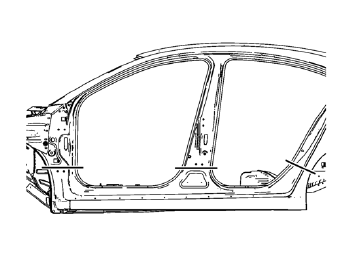
- Create cut lines on the rocker outer panel.
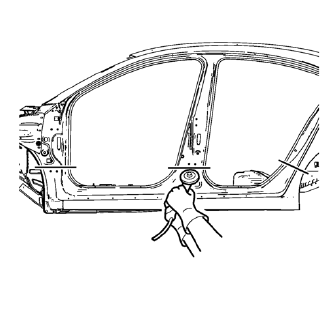
Note: Do not damage any inner panels or reinforcements.
- Cut the panel where sectioning is to be performed.
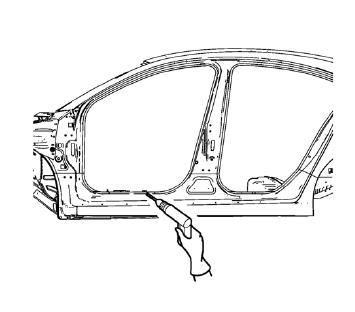
- Locate and mark all the necessary factory welds of the rocker outer panel.
- Drill all factory welds. Note the number and location of welds for installation of the service assembly.
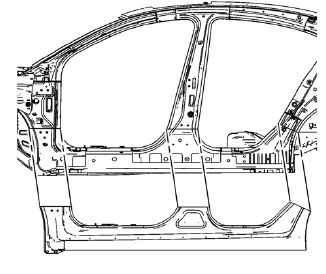
- Remove the damaged rocker outer panel.
 Rocker Outer Panel Sectioning (MAG-Welding)
Note: According to different corrosion warranties, only the
regional mandatory joining methods are allowed. ...
 Installation Procedure
Cut the rocker outer panel in corresponding locations to fit the
remaining original panel. The sectioning joint should be trimmed to
allow a gap of one-and-one-half-times the metal thickne ...
Other materials:
Seat Adjustment
WARNING
You can lose control of the vehicle if you try to adjust a driver seat while
the vehicle is moving.
Adjust the driver seat only when the vehicle is not moving.
To adjust a manual seat:
1. Pull the handle at the front of the seat.
2. Slide the seat to the desired position and release ...
Battery Voltage and Charging Messages
BATTERY SAVER ACTIVE
This message displays when the vehicle has detected that the battery voltage
is dropping beyond a reasonable point. The battery saver system starts reducing
features of the vehicle that may be noticed. At the point that features are disabled,
this message displays. Turn o ...
SIR Identification Views
The SIR Identification Views shown below illustrate the approximate location
of all SIR components available for the vehicle. This will assist
in determining the appropriate SIR Disabling and Enabling for a given service
procedure, refer to SIR Disabling and Enabling.
Front End Sensor-- ...
