
Chevrolet Cruze Repair Manual: Removal Procedure
Warning: Refer to Approved Equipment for Collision Repair Warning in the Preface section.
Warning: Refer to Glass and Sheet Metal Handling Warning in the Preface section.
- Disable the SIR System. Refer to SIR Disabling and Enabling.
- Disconnect the negative battery cable. Refer to Battery Negative Cable Disconnection and Connection.
- Remove all related panels and components.
- Visually inspect the damage. Repair as much of the damage as possible.
- Remove the sealers and anti-corrosion materials from the repair area, as necessary. Refer to Anti-Corrosion Treatment and Repair.
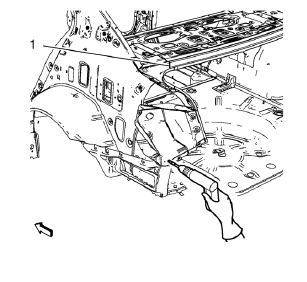
- Locate and mark all the necessary factory welds of the body rear end panel.
Note: Drill factory welds in area of the rear end upper panel reinforcement (1) from above. Create slots out of the drill holes for later brazing.
- Drill all factory welds. Note the number and location of welds for installation of the service assembly.
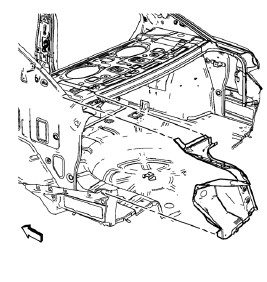
- Remove the tail lamp pocket.
 Tail Lamp Pocket Replacement (MIG-Brazing)
Note: According to different corrosion warranties, only the
regional mandatory joining methods are allowed. ...
 Installation Procedure
Create 5 x 18 mm (4/16 x 11/16 in) slots for MIG-brazing along the edges
of the tail lamp pocket as noted f rom the
original panel.
Note:
Clean and prepare the attaching surf ...
Other materials:
Infants and Young Children
Everyone in a vehicle needs protection! This includes infants and all other children.
Neither the distance traveled nor the age and size of the traveler changes the need,
for everyone, to use safety restraints. In fact, the law in every state in the United
States and in every Canadian province ...
Installation Procedure
Apply structural adhesive on the flanges of the rear side door inner
panel where the rear side door outer panel bears on.
Align the rear side door outer panel.
Verify the fit of the rear side door outer panel.
Clamp the rear side door outer panel
into position.
Pre-fla ...
SIR Inflator Module Handling and Storage Warning
Warning: When carrying an undeployed inflator module:
Do not carry the inflator module by the wires or connector.
Make sure the air bag opening points away from you.
When storing an undeployed inflator module:
Make sure the air bag opening points away from the surface on which
the in ...
