
Chevrolet Cruze Repair Manual: Installation Procedure
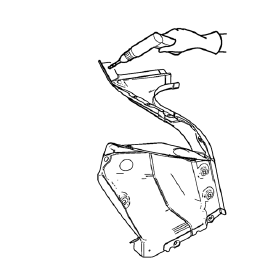
- Create 5 x 18 mm (4/16 x 11/16 in) slots for MIG-brazing along the edges of the tail lamp pocket as noted f rom the original panel.
Note:
- Clean and prepare the attaching surfaces for brazing.
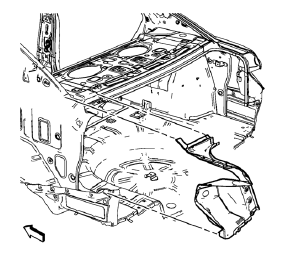
- Position the tail lamp pocket on the vehicle.
- Verify the fit of the tail lamp pocket.
- Clamp the tail lamp pocket into position.
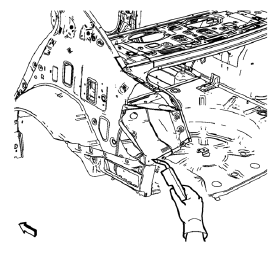
- Braze accordingly.
- Apply the sealers and anti-corrosion materials to the repair area, as necessary. Refer to Anti-Corrosion Treatment and Repair.
- Paint the repaired area. Refer to Basecoat/Clearcoat Paint Systems.
- Install all related panels and components.
- Connect the negative battery cable. Refer to Battery Negative Cable Disconnection and Connection.
- Enable the SIR system. Refer to SIR Disabling and Enabling.
 Removal Procedure
Warning: Refer to Approved Equipment for Collision Repair Warning in the
Preface section.
Warning: Refer to Glass and Sheet Metal Handling Warning in the Preface section.
Disable the SIR Syst ...
 Dual Phase Steel
This information provides repair recommendations and general guidelines for
steel classified as Dual Phase Steel (Dual Phase Steel with a
tensile strength up to and including 800 MPa), also known a ...
Other materials:
Front Lower Control Arm Bushing Replacement
Preliminary Procedure
Raise and support the vehicle. Refer to Lifting and Jacking the
Vehicle.
Remove the tire and wheel. Refer to Tire and Wheel Removal and
Installation.
Remove the lower control arm. Refer to Lower Control Arm Replacement.
Lower Control Arm Rear Bushing ...
Airbag Readiness Light
This light shows if there is an electrical problem with the airbag system. The
system check includes the airbag sensor(s), passenger sensing system, the pretensioners,
the airbag modules, the wiring, and the crash sensing and diagnostic module.
The airbag readiness light comes on for several ...
Rear Bumper Fascia Outer Guide Replacement
Preliminary Procedure
Remove the rear bumper fascia. Refer to Rear Bumper Fascia Replacement.
Rear Bumper Fascia Outer Guide Rivet (Qty: 3)
Special Tools
BO-594-A Hand Rivet Tongs
For equivalent regional tools, refer to Special Tools.
Rear Bumper Fascia Outer Guide
...
