
Chevrolet Cruze Repair Manual: Backup Lamp Replacement
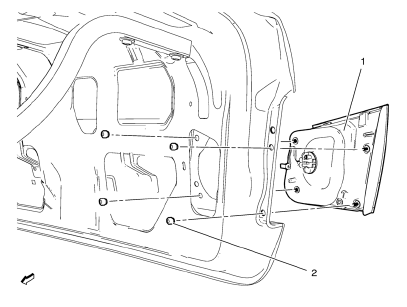
Preliminary Procedures
- Remove the rear compartment sill trim plate. Refer to Rear Compartment Sill Trim Plate Replacement.
- Disconnect the electrical harness connector from the backup lamp socket.
- Back Up Lamp Nut (Qty: 4)
Caution: Refer to Fastener Caution in the Preface section.
Tighten 5 N·m (44 lb ft)
- Back Up Lamp Assembly
Warning: Refer to Glass and Sheet Metal Handling Warning in the Preface section.
Warning: Refer to Halogen Bulb Warning in the Preface section.
Procedure
- Reach inside the rear compartment lid inner panel and remove the lower and upper retainer nuts securing the lamp assembly to the outer rear compartment lid panel.
- Push the inside edge of the lamp assembly outward from the rear outer compartment lid panel.
- Remove and transfer the bulb socket from the back up lamp assembly.
Backup Lamp Bulb Replacement
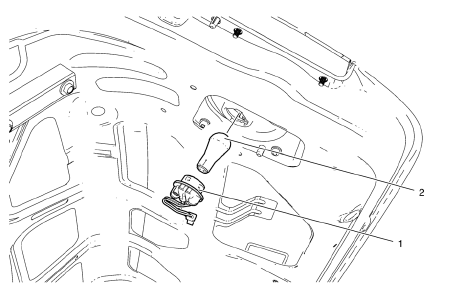
Warning: Refer to Glass and Sheet Metal Handling Warning in the Preface section.
Preliminary Procedure
Remove the rear compartment sill trim plate. Refer to Rear Compartment Sill Trim Plate Replacement.
- Back Up Lamp Socket
Tip
Rotate the lamp socket counterclockwise and remove from the tail lamp housing.
- Back Up Lamp Bulb
Warning: Refer to Halogen Bulb Warning in the Preface section.
Procedure
Remove the bulb from the lamp socket.
 Fog Lamp Aiming
Preparation Procedure
Important: Horizontal aim is not adjustable on this vehicle.
Vertical aim is done by an adjusting nut located on the rear of the fog lamp.
Prior to aiming the fog lamps, pe ...
 Forward Lamp Wiring Harness Replacement
Preliminary Procedures
Remove the front bumper. Refer to Front Bumper Fascia Replacement.
Remove the headlamp. Refer to Headlamp Replacement.
Using a scan tool, check for DTCs.
Forward ...
Other materials:
Bluetooth (Voice Recognition)
Using Voice Recognition
To use voice recognition, press the
button located on the steering wheel.
Use the commands below for the various voice features. For additional information,
say “Help” while you are in a voice recognition menu.
Pairing
A Bluetooth-enabled cell phone must be paired to ...
Rear Window Defogger Description and Operation
Rear Window Defogger System Components
The rear window defogger system consists of the following components:
HVAC Control Module
HVAC Control Head
Rear Window Defogger Relay
Rear Defogger Grid
F28UA 40A Fuse
Rear Window Defogger Operation
The rear defog control system utilizes a sin ...
Tire Chains
WARNING
Do not use tire chains. There is not enough clearance. Tire chains used on
a vehicle without the proper amount of clearance can cause damage to the brakes,
suspension, or other vehicle parts. The area damaged by the tire chains could cause
loss of control and a crash. Use another type ...
