
Chevrolet Cruze Owners Manual: Replacement Bulbs
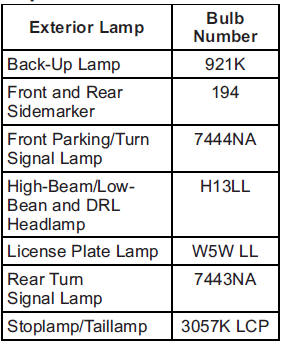
For replacement bulbs not listed here, contact your dealer.
 License Plate Lamp
To replace the license plate lamp bulb:
1. Remove the two screws from the license plate lamp assembly.
2. Turn and pull the license plate lamp assembly down.
3. Turn the bulb socket countercloc ...

Other materials:
Exterior Lamp Controls
The exterior lamp control is to the left of the steering column on the instrument
panel.
There are four positions:
(Off): Briefly turn to this position
to turn the automatic lamp control off or on again.
AUTO (Automatic): Turns the headlamps on automatically at normal brightness,
togethe ...
Hood Replacement
Warning: When a hood hold open device is being removed or installed,
provide alternate support to avoid the possibility of
damage to the vehicle or personal injury.
Preliminary Procedure
Remove the windshield washer nozzle hose. Refer to Windshield Washer Nozzle
Hose Replacement.
Hood ...
CD Player
The CD player can play audio CDs and MP3 CDs.
The CD player will not play 8 cm (3 in) CDs.
Care of CDs
Sound quality can be reduced due to disc quality, recording method, quality of
the music recorded, and how the disc has been handled.
Handle discs carefully and store them in their original c ...
