
Chevrolet Cruze Repair Manual: Hood Primary Latch Release Cable Handle Replacement
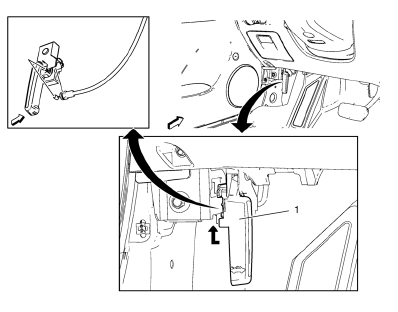
Preliminary Procedure
Remove the front side door sill trim plate. Refer to Front Side Door Sill Trim Plate Replacement.
Hood Primary Latch Release Cable Handle
Procedure
- Pull down the hood primary latch release cable handle.
- To release the handle, pull down the cable and unhook from the handle.
 Rear Side Door Wiring Harness Replacement
Preliminary Procedure
Remove the rear side door inner panel trim. Refer to Rear Side Door Trim
Replacement.
Rear Side Door Wiring Harness
Warning: Unless directed otherwise, the ignition ...
 Front Side Door Upper Hinge and Lower Hinge Replacement
Preliminary Procedure
Remove the front wheelhouse liner. Refer to Front Wheelhouse Liner
Replacement.
Remove the front fender insulator. Refer to Front Fender Insulator
Replacement.
...
Other materials:
Pandora Internet Radio
Pandora® (if equipped) is a free Internet radio service that streams personalized
radio stations based on artists, songs, genres, and comedians. Create stations using
the Pandora website or smartphone application, then use
(thumbs up) or
(thumbs down) to personalize stations.
To set up an ...
Starter Switch Check
WARNING
When you are doing this inspection, the vehicle could move suddenly. If the
vehicle moves, you or others could be injured.
1. Before starting this check, be sure there is enough room around the vehicle.
2. Firmly apply both the parking brake and the regular brake.
Do not use the accele ...
Removal Procedure
Warning: Refer to Approved Equipment for Collision Repair Warning in the
Preface section.
Warning: Refer to Glass and Sheet Metal Handling Warning in the Preface section.
Disable the SIR System. Refer to SIR
Disabling and Enabling.
Disconnect the negative battery cable. Refer to ...
