
Chevrolet Cruze Repair Manual: Installation Procedure
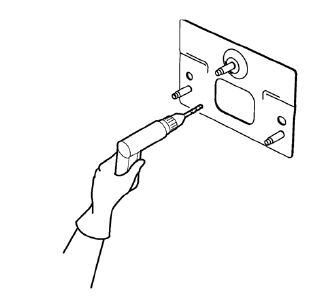
- Drill 8 mm (5/16 in) for plug welding along the edges of the rear bumper impact bar stud plate as noted from the original panel.
Note: If the location of the original plug weld holes can not be determined, space the plug weld holes every 40 mm (1½ in).
- Clean and prepare the attaching surfaces for welding.
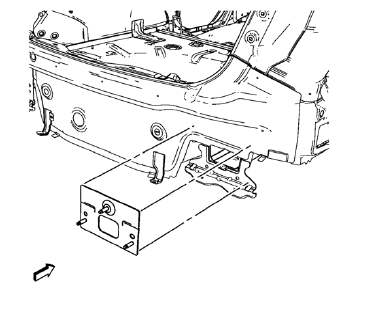
- Position the rear bumper impact bar stud plate on the vehicle.
- Verify the fit of the rear bumper impact bar stud plate.
- Clamp the rear bumper impact bar stud plate into position.
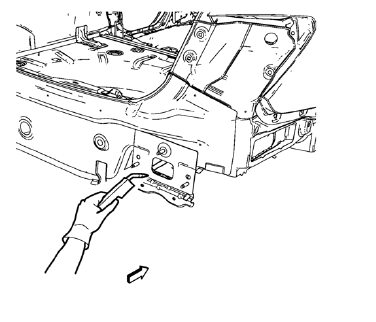
- Plug weld accordingly.
- Apply the sealers and anti-corrosion materials to the repair area, as necessary. Refer to Anti-Corrosion Treatment and Repair.
- Paint the repaired area. Refer to Basecoat/Clearcoat Paint Systems.
- Install all related panels and components.
- Connect the negative battery cable. Refer to Battery Negative Cable Disconnection and Connection.
- Enable the SIR system. Refer to SIR Disabling and Enabling.
 Removal Procedure
Warning: Refer to Approved Equipment for Collision Repair Warning in the
Preface section.
Warning: Refer to Glass and Sheet Metal Handling Warning in the Preface section.
Disable the SIR Syst ...
 Rear Bumper Impact Bar Stud Plate Replacement (MIG-Brazing)
Note: According to different corrosion warranties, only the
regional mandatory joining methods are allowed. ...
Other materials:
Removal Procedure
Warning: Refer to Approved Equipment for Collision Repair Warning in the
Preface section.
Warning: Refer to Collision Sectioning Warning in the Preface section.
Warning: Refer to Glass and Sheet Metal Handling Warning in the Preface section.
Disable the SIR System. Refer to SIR Disabling ...
Installation Procedure
Drill 8 mm (5/16 in) for plug welding along the edges of the service
panel as noted from the original panel.
Clean and prepare the attaching surfaces for welding.
Apply one-part windshield urethane adhesive as noted
from the original panel.
Position the roof ...
Front Floor Console Replacement
Preliminary Procedure
Remove the instrument panel lower trim panel - left side. Refer to
Instrument Panel Lower Trim Panel Replacement - Left
Side
Remove the instrument panel lower trim panel - right side. Refer to
Instrument Panel Lower Trim Panel Replacement - Right
Side
Remo ...
