
Chevrolet Cruze Repair Manual: Installation Procedure
- Apply structural adhesive on the flanges of the rear side door inner panel where the rear side door outer panel bears on.
- Align the rear side door outer panel.
- Verify the fit of the rear side door outer panel.
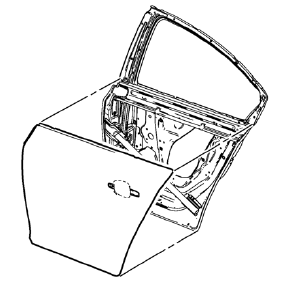
- Clamp the rear side door outer panel into position.
- Pre-flanging the flange with BO-6396 pliers and BO-6392 tool kit .
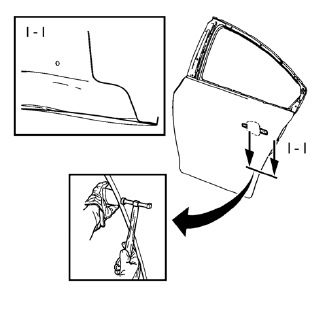
- Continue to hammer in stages along the hem flanges.
- Apply the sealers and anti-corrosion materials to the repair area, as necessary. Refer to Anti-Corrosion Treatment and Repair.
- Install the rear side door outside handle. Refer to Rear Side Door Outside Handle Replacement.
- Install the rear side door. Refer to Rear Side Door Replacement.
- Paint the repaired area. Refer to Basecoat/Clearcoat Paint Systems.
- Connect the negative battery cable. Refer to Battery Negative Cable Disconnection and Connection
- Enable the SIR system. Refer to SIR Disabling and Enabling.
 Removal Procedure
Warning: Refer to Glass and Sheet Metal Handling Warning in the
Preface section.
Disable the SIR System. Refer to SIR
Disabling and Enabling.
Disconnect the negative battery cable. R ...
 Rear Rail Sectioning (MAG-Welding)
Note: According to different corrosion warranties, only the
regional mandatory joining methods are allowed. ...
Other materials:
Removal Procedure
Warning: Refer to Approved Equipment for Collision Repair Warning in the
Preface section.
Warning: Refer to Collision Sectioning Warning in the Preface section.
Warning: Refer to Glass and Sheet Metal Handling Warning in the Preface section.
Disable the SIR System. Refer to SIR Dis ...
Hydraulic Clutch
For vehicles with a manual transmission, it is not necessary to regularly check
brake/clutch fluid unless there is a leak suspected.
Adding fluid will not correct a leak.
A fluid loss in this system could indicate a problem. Have the system inspected
and repaired.
When to Check and What to Us ...
Front Side Door Check Replacement
Prliminary Procedure
Remove front side door trim panel. Refer to Front Side Door Trim
Replacement
Remove the front side door water deflector. Refer to Front Side Door
Water Deflector Replacement
Front Side Door Check Link Bolt
Caution: Refer to Fastener Caution in the ...
