
Chevrolet Cruze Repair Manual: Removal Procedure
Warning: Refer to Approved Equipment for Collision Repair Warning in the Preface section.
Warning: Refer to Glass and Sheet Metal Handling Warning in the Preface section.
- Disable the SIR System. Refer to SIR Disabling and Enabling.
- Disconnect the negative battery cable. Refer to Battery Negative Cable Disconnection and Connection.
- Remove all related panels and components.
- Visually inspect the damage. Repair as much of the damage as possible.
- Remove the sealers and anti-corrosion materials from the repair area, as necessary. Refer to Anti-Corrosion Treatment and Repair.
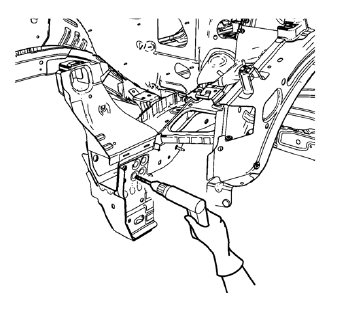
- Locate and mark all the necessary factory welds and weld seams of the drivetrain and front suspension frame front support.
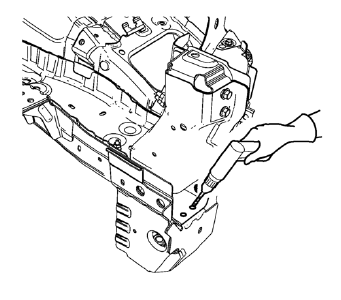
- Drill out front flange of front suspension support frame from above through the front compartment side rail.
Note: Drill holes are necessary for later plug welds.
- Drill all factory welds. Note the number and location of welds for installation of the service assembly.
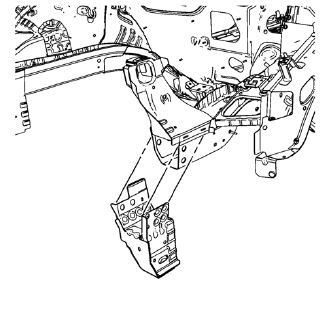
- Remove the drivetrain and front suspension frame front support.
 Drivetrain and Front Suspension Frame Front Support Replacement (MAG-Welding)
Note: According to different corrosion warranties, only the
regional mandatory joining methods are allowed. ...
 Installation Procedure
Drill 8 mm (5/16 in) for plug welding along the edges of the drivetrain
and front suspension frame front support as noted from the
original panel.
Clean and prepare the attaching &n ...
Other materials:
Wiper Blade Replacement
Windshield wiper blades should be inspected for wear and cracking.
Replacement blades come in different types and are removed in different ways.
Notice: Allowing the wiper arm to touch the windshield when no wiper
blade is installed could damage the windshield. Any damage that occurs would not
...
Engine Power Messages
ENGINE POWER IS REDUCED
This message displays when the vehicle's engine power is reduced.
Reduced engine power can affect the vehicle's ability to accelerate.
If this message is on, but there is no reduction in performance, proceed to your
destination. The performance may be reduced the ...
Work Stall Test Warning
Warning: One or more of the following guidelines may apply when performing
specific required tests in the work stall:
When a test requires spinning the drive wheels with the vehicle jacked up,
adhere to the following precautions:
Do not exceed 56 km/h (35 mph) when spinning one drive wheel ...
