
Chevrolet Cruze Repair Manual: Removal Procedure
- Turn the front wheels to the straight forward position and secure the steering wheel from moving.
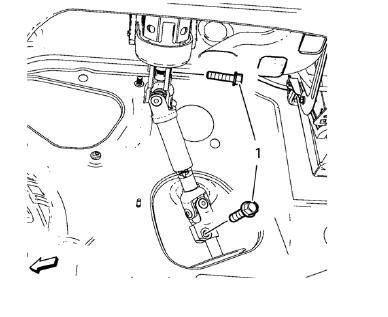
- Remove the 2 lower steering intermediate shaft bolts (1).
- Remove the steering intermediate shaft from the steering gear.
- Raise and support the vehicle. Refer to Lifting and Jacking the Vehicle
- Remove the tire and wheel assemblies. Refer to Tire and Wheel Removal and Installation
- Remove the front compartment insulator, if equipped.
- Remove the engine shield, if equipped
- Remove the exhaust flexible pipe. Refer to Exhaust Flexible Pipe Replacement.
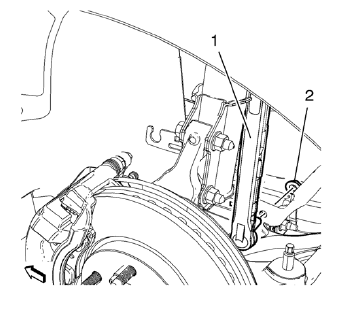
- Remove lower stabilizer link shaft nut (2) on both sides.
- Remove stabilizer link shaft (1) from stabilizer shaft.
- Remove stabilizer link shaft (1) from stabilizer.
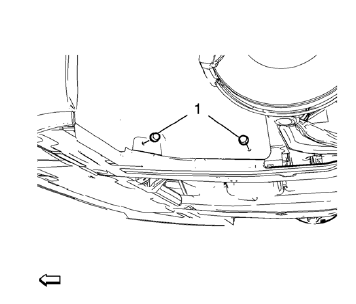
- Remove 4 fasteners (1) for the engine side cover on both sides.
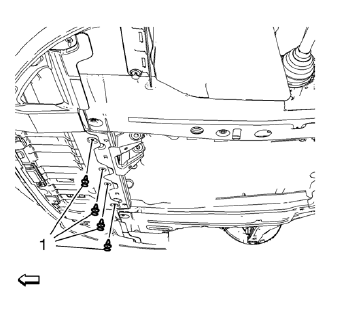
- Remove 4 fasteners (1) for the front engine compartment cover.
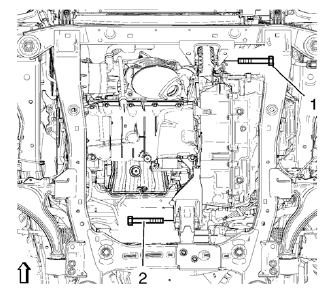
- Remove the front and rear transmission mount bracket bolts (1, 2).
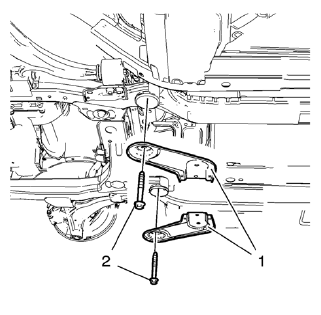
- Remove and DISCARD 2 rear suspension frame bolts (2).
Remove rear frame reinforcements (1).
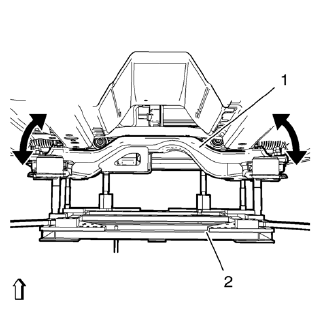
- Position and set hydraulic lifter in connection with CH 904 frame and CH 49289-50 adapter (2) onto suspension frame (1). Bent from cover beside.
- Lower suspension frame max. 55 mm.
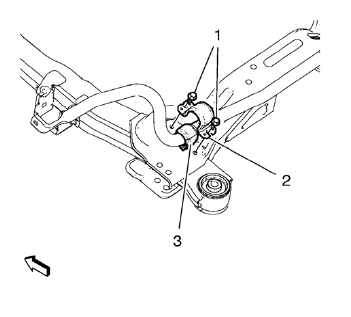
Note: In order to assure a correct installation of the insulators ONLY remove and install the insulators side by side! Dismantled MUST BE discarded.
- Remove and discard the two front stabilizer shaft insulator clamp bolts (1).
- Remove the shaft insulator clamp (2).
Bend up clamp (2) slightly.
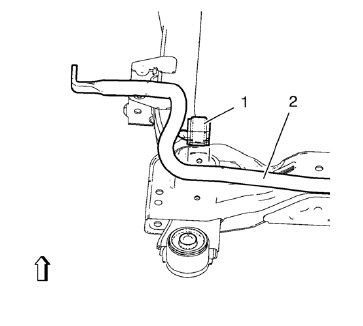
- Mark the location of the insulator (1) to the stabilizer shaft (2).
- Remove insulator (1) from stabilizer shaft (2).
 Stabilizer Shaft Insulator Replacement
Special Tools
CH 904 Underframe
EN 45059 Torque Angle Sensor Kit
CH 49289 Centering Adapter
For equivalent regional tools, refer to Special Tools. ...
 Installation Procedure
Install NEW stabilizer shaft insulators (1) to stabilizer shaft (2) so
that the slit in the insulator is facing the rear of the vehicle.
Install the insulator c 2. lamp to the insu ...
Other materials:
Steering Wheel Inflatable Restraint Module Coil Replacement
Preliminary Procedure
Remove the steering column upper trim cover. Refer to Steering Column
Upper Trim Cover Replacement.
Remove the steering column lower trim cover. Refer to Steering Column
Lower Trim Cover Replacement.
Remove the steering wheel. Refer to Steering Wheel Rep ...
Braking
Braking action involves perception time and reaction time. Deciding to push the
brake pedal is perception time. Actually doing it is reaction time.
Average driver reaction time is about three-quarters of a second. In that time,
a vehicle moving at 100 km/h (60 mph) travels 20m (66 ft), which co ...
Drive Belt Replacement
Special Tools
EN 6349 Locking Pin
For equivalent regional tools, refer to Special Tools.
Removal Procedure
Open the hood.
Remove the power steering pump belt. Refer to Power Steering Pump Belt
Replacement.
Raise the vehicle by its full height. Refer to Lifting and Jacking the
Vehicl ...
