
Chevrolet Cruze Owners Manual: Cooling System
The cooling system allows the engine to maintain the correct working temperature.
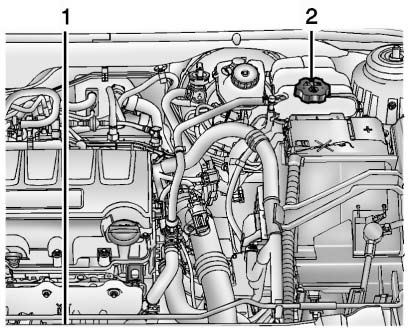
1.4L L4 Engine Shown, 1.8L L4 Engine Similar
1. Engine Cooling Fan (Out of View) 2. Engine Coolant Surge Tank and Pressure Cap
WARNING
An electric engine cooling fan under the hood can start up even when the engine is not running and can cause injury. Keep hands, clothing, and tools away from any underhood electric fan.
WARNING
Heater and radiator hoses, and other engine parts, can be very hot. Do not touch them. If you do, you can be burned.
Do not run the engine if there is a leak. If you run the engine, it could lose all coolant. That could cause an engine fire, and you could be burned. Get any leak fixed before you drive the vehicle.
Notice: Using coolant other than DEX-COOL® can cause premature engine, heater core, or radiator corrosion. In addition, the engine coolant could require changing sooner, at 50 000 km (30,000 mi) or 24 months, whichever occurs first. Any repairs would not be covered by the vehicle warranty.
Always use DEX-COOL (silicate-free) coolant in the vehicle.
 Engine Air Cleaner/Filter
When to Inspect the Engine Air Cleaner/Filter
Inspect the air cleaner/filter at the scheduled maintenance intervals and replace
it at the first oil change after each 80 000 km (50,000 mi) interval. ...
 Engine Coolant
The cooling system in the vehicle is filled with DEX-COOL engine coolant. This
coolant is designed to remain in the vehicle for 5 years or 240 000 km (150,000
mi), whichever occurs first.
The fol ...
Other materials:
Safety System Check
Now and then, check that the safety belt reminder light, safety belts, buckles,
latch plates, retractors, and anchorages are all working properly.
Look for any other loose or damaged safety belt system parts that might keep
a safety belt system from doing its job. See your dealer to have it rep ...
Removal Procedure
Warning: Refer to Approved Equipment for Collision Repair Warning in the
Preface section.
Warning: Refer to Glass and Sheet Metal Handling Warning in the Preface section.
Disable the SIR System. Refer to SIR Disabling
and Enabling.
Disconnect the negative battery cable. Refer to Batter ...
Exterior Lighting
The exterior lamp control is to the left of the steering column on the instrument
panel.
: Briefly turn to this position
to turn the automatic lamp control off or on again.
AUTO: Turns the headlamps on automatically at normal brightness, together with
the parking lamps, taillamps, license ...
