
Chevrolet Cruze Repair Manual: Front Side Door Weatherstrip Replacement - Door Side
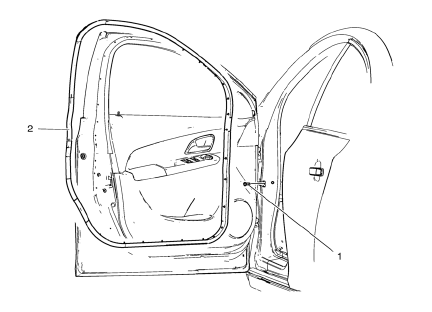
- Front Side Door Check Bolt
Caution: Refer to Fastener Caution in the Preface section.
Tighten 25 N·m (19 lb ft)
- Front Side Door Weatherstrip - Door Side
Procedure
- Unclip weatherstrip 1. from front side door.
- When removing protective liners from adhesive tape, be careful not to touch tape with hands and do not allow tape to come in contact with dirt or any foreign matter prior to adhesion.
 Radiator Grille Reinforcement Support Replacement
Preliminary Procedure
Remove the front bumper fascia. Refer to Front Bumper Fascia Replacement.
Radiator Grille Reinforcement Support Bolt (Qty: 4)
Caution: Refer to Fastener Caution in th ...
 Front Side Door Weatherstrip Replacement - Body Side
Front Side Door Weatherstrip - Body Side
Procedure
Start at the rear upper corner of the door opening and pull the
weatherstrip away from the door opening flange.
Position th ...
Other materials:
Rear Vision Camera (RVC)
This vehicle may have the RVC system. Read this entire section before using it.
The RVC system can assist the driver when backing up by displaying a view of
the area behind the vehicle.
WARNING
The RVC system does not display children, pedestrians, bicyclists, animals,
or any other object loc ...
Heating and Air Conditioning System Description and Operation
Engine Coolant
Engine coolant is the key element of the heating system. The thermostat
controls engine operating coolant temperature. The thermostat
also creates a restriction for the cooling system that promotes a positive
coolant flow and helps prevent cavitation. Coolant enters the
heater ...
Steering Column in Lock Position Caution
Caution: With wheels of the vehicle facing straight ahead, secure
the steering wheel utilizing steering column anti-rotation pin, steering
column lock, or a strap to prevent rotation. Locking of the steering column will
prevent damage and a possible malfunction of the SIR
system. The steering ...
