
Chevrolet Cruze Repair Manual: Installation Procedure
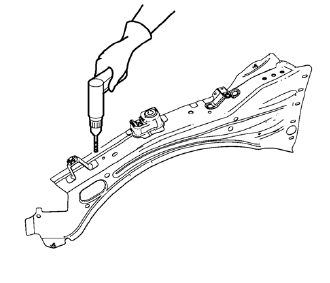
- Drill 8 mm (5/16 in) for plug welding along the edges of the front compartment upper side rail as noted from the original panel.
- Clean and prepare the attaching surfaces for welding.
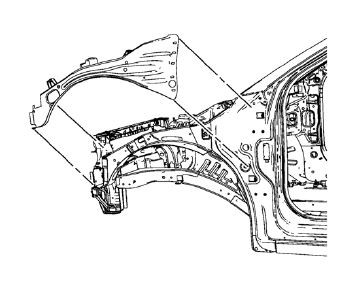
- Position the front compartment upper side rail on the vehicle.
- Verify the fit of the front compartment upper side rail.
- Clamp the front compartment upper side rail into position.
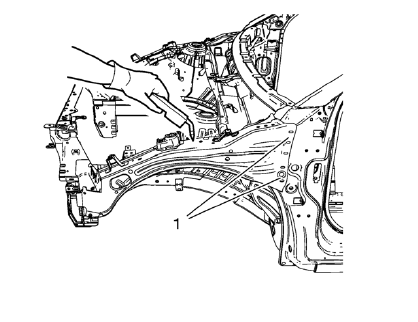
Note: Plug weld factory slots in the front hinge pillar body area (1) as noted from the original panel.
- Plug weld accordingly.
- Apply the sealers and anti-corrosion materials to the repair area, as necessary. Refer to Anti-Corrosion Treatment and Repair.
- Paint the repaired area. Refer to Basecoat/Clearcoat Paint Systems.
- Install all related panels and components.
- Connect the negative battery cable. Refer to Battery Negative Cable Disconnection and Connection.
- Enable the SIR system. Refer to SIR Disabling and Enabling.
 Removal Procedure
Warning: Refer to Approved Equipment for Collision Repair Warning in the
Preface section.
Warning: Refer to Glass and Sheet Metal Handling Warning in the Preface section.
Disable the SIR Syst ...
 Front Compartment Upper Side Rail Replacement (MIG-Brazing)
Note: According to different corrosion warranties, only the
regional mandatory joining methods are allowed. ...
Other materials:
Windshield Garnish Molding Replacement
Preliminary Procedure
Disable the SIR system. Refer to SIR Disabling and Enabling.
Windshield Garnish Molding Assembly
Procedure
Loosen tether clip and steel clips.
Disconnect electrical connector.
The tether clip at the upper portion of the garnish molding MUST be
repla ...
Brake Drum Replacement
Special Tools
CH 41013 Rotor Resurfacing Kit
CH 42450-A Wheel Hub Resurfacing Kit
For equivalent regional tools, refer to Special Tools.
Removal Procedure
Warning: Refer to Brake Dust Warning in the Preface section.
Check to ensure that the park brake is fully released
R ...
Wheel Stud Replacement
Special Tools
CH-43631 Ball Joint Remover
For equivalent regional tools, refer to Special Tools.
Removal Procedure
Raise and suitably support the vehicle. Refer to Lifting and
Jacking the Vehicle.
Remove the tire and wheel assembly. Refer to Tire and Wheel Removal and
Installati ...
