
Chevrolet Cruze Repair Manual: Installation Procedure
- Clean and prepare the attaching surfaces for brazing.
- Apply structural adhesive to the attaching surfaces.
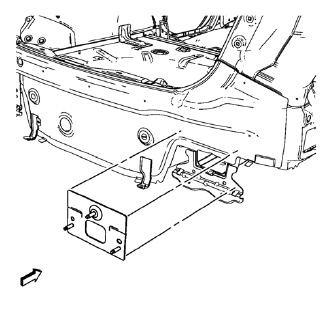
- Position the rear bumper impact bar stud plate on the vehicle.
- Verify the fit of the rear bumper impact bar stud plate
- Clamp the rear bumper impact bar stud plate into position.
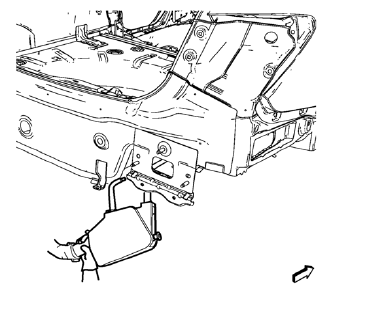
- Spot weld accordingly.
- Apply the sealers and anti-corrosion materials to the repair area, as necessary. Refer to Anti-Corrosion Treatment and Repair.
- Paint the repaired area. Refer to Basecoat/Clearcoat Paint Systems.
- Install all related panels and components.
- Connect the negative battery cable. Refer to Battery Negative Cable Disconnection and Connection.
- Enable the SIR system. Refer to SIR Disabling and Enabling.
 Removal Procedure
Warning: Refer to Approved Equipment for Collision Repair Warning in the
Preface section.
Warning: Refer to Glass and Sheet Metal Handling Warning in the Preface section.
Disable the SIR Syst ...
 Front Side Door Outer Panel Replacement (MAG-Welding)
Special Tools
BO-6396 Bonding Pliers
BO-6392 Flanging Tool Kit
For equivalent regional tools, refer to Special Tools
Note: According to different corrosion warranties, only the
regional ma ...
Other materials:
Filling the Tank
WARNING
Fuel vapors and fuel fires burn violently and can cause injury or death.
• To help avoid injuries to you and others, read and follow all the instructions
on the fuel pump island.
• Turn off the engine when refueling.
• Keep sparks, flames, and smoking materials away from fuel.
• Do no ...
Steering Wheel Controls
For vehicles with audio steering wheel controls, some audio controls can be adjusted
at the steering wheel.
(Push to Talk): For vehicles with
a Bluetooth, OnStar, or navigation system, press to interact with those systems.
(Mute/End Call): Press to silence
the vehicle speakers only.
Pre ...
Ultra High Strength Dual Phase Steel
This information provides repair recommendations and general guidelines for
steel classified as Ultra High Strength Dual Phase Steel (Dual
Phase Steel with a tensile strength greater than 800 MPa), also known as DPX.
General Motors recommends the following when repairing or replacing this type ...
